6 Ways to Use User Onboarding Checklists in 2025
Imagine downloading a new app, excited about its promises, but within five minutes, you’re overwhelmed. You’re not sure what to do next. There are buttons everywhere. Features seem powerful, but… where’s the roadmap without user onboarding checklist?
Now, what happens when you have a clear, friendly checklist pops up: "Here's how to get started." You tick off one task, then the next. You're learning as you go. You're achieving small wins. It feels good.
That’s the power of a well-designed user onboarding checklist.
User onboarding checklists aren’t just helpful; they’re one of the smartest tools in your user onboarding toolkit. They serve as silent guides, helping new users explore your product, understand its value, and build habits that lead to long-term engagement.
In the product-led growth (PLG) world, where your product is your primary driver of acquisition, retention, and expansion, checklists aren’t optional—they’re essential.
Let’s explore 6 powerful ways to use user onboarding checklists to guide new users to take your onboarding to the next level.
Benefits of Using User Onboarding Checklists
Here are some instances of what can be accomplished with a well-planned new user onboarding checklist:
- Encourage them to take the appropriate next steps in your product to avoid missing out on the most valuable features and functions.
- Help customers reach their "aha!" moment, which encourages product adoption: "Aha!" moments occur when users realize how a product makes their life easier. Use checklists to guide consumers through important product actions that will help them understand how your product fits into their daily workflows.
- Checklists allow you to provide education and assistance through examples, making your product easy to grasp for all user groups, including those who have never seen or interacted with a product like yours.
- When creating a user onboarding checklist, organizations must examine user behavior to identify tipping points in the product journey that contribute to client activation and retention.
- Tracking user engagement through user onboarding checklists also provides insight into the tasks and behaviors that result in the highest drop-off rates, support inquiries, and user displeasure signals.
4 Elements of a Good User Onboarding Checklist
An effective onboarding checklist is more than just a to-do list — it’s a guided path to product value. A complicated onboarding process will drive 74% of potential customers away. The best user onboarding checklists are clear, strategic, and tailored to help new users unlock your tool’s potential. Here’s what makes one great:
1. Clear, Actionable Steps
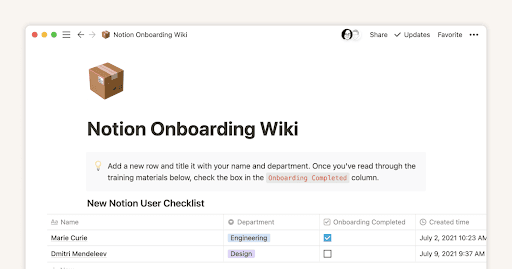
Each task should be easy to understand and accomplish. Avoid technical jargon unless your audience is highly skilled. For example, Notion’s onboarding guides new users with simple actions like “Create a new page” or “Add a template,” helping users experience value immediately.
2. Logical Flow and Visual Cues
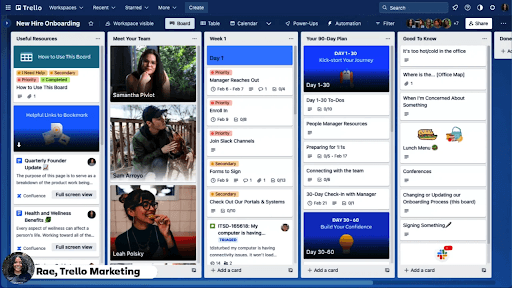
Structure tasks in a sequence that mirrors the user journey — starting with setup, then diving into features. Tools like Trello use visual user onboarding checklists, progress bars, and playful animations to keep users engaged while maintaining logical flow.
3. Personalized Experience
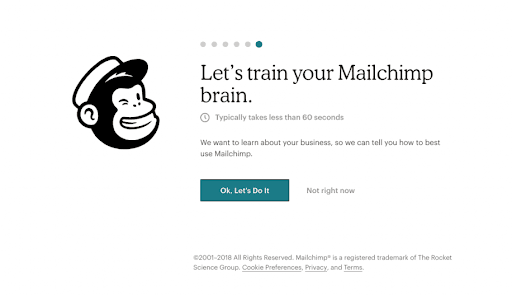
Tailor onboarding paths based on user roles or goals. Mailchimp, for instance, asks users about their marketing experience and objectives, then adjusts the checklist accordingly. This makes onboarding more relevant and user-centric.
4. Celebrate Progress
Acknowledge user achievements to build momentum. Duolingo excels at this, offering badges and messages like “You’re on fire!” after milestones, making users feel proud and motivated to continue.
6 Tips for a Great SaaS User Onboarding Checklists
1. Understand Your Users and Their Context
Before designing your onboarding, identify your ideal customer persona (ICP). Understanding who your users are and the problems your product solves for them ensures relevance.
“Ben Silbermann, co-founder of Pinterest, says it was challenging to convince users about the app’s benefits when it was first released. “No one really got it, to be totally honest with you,” he says.
Use omnichannel feedback tools (in-app pop-ups, emails, chatbots) to collect focused feedback about onboarding. Prioritize insights that help you shape better onboarding paths.
2. Map the User Journey
Create detailed user flow and journey maps based on the unique roles your users play. In 97% of cases, new customers prefer to be welcomed and educated by video. This helps in designing onboarding experiences tailored to real-world workflows. AbleTo, a digital mental health platform, discovered that therapists struggled to access training during sessions. By analyzing user behavior, they embedded training into the platform, streamlining the experience and reducing friction.
3. Identify the “Aha!” Moment
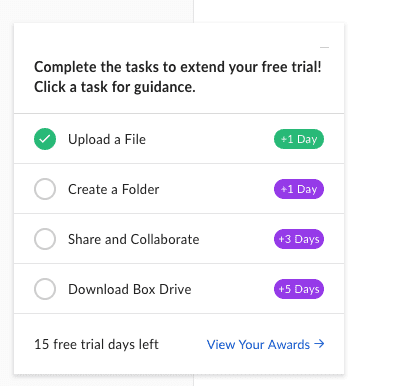
The “aha!” moment is when users realize the true value of your product. For Zoom, this happens when a user successfully hosts their first meeting. Design user onboarding checklists that drive users to such moments. 75% of users abandon an app within the first week if it is difficult to use. Box, for example, guides users to download Box Drive — a core differentiator, and even incentivizes completion with a trial extension.
4. Use Interactive UI Elements
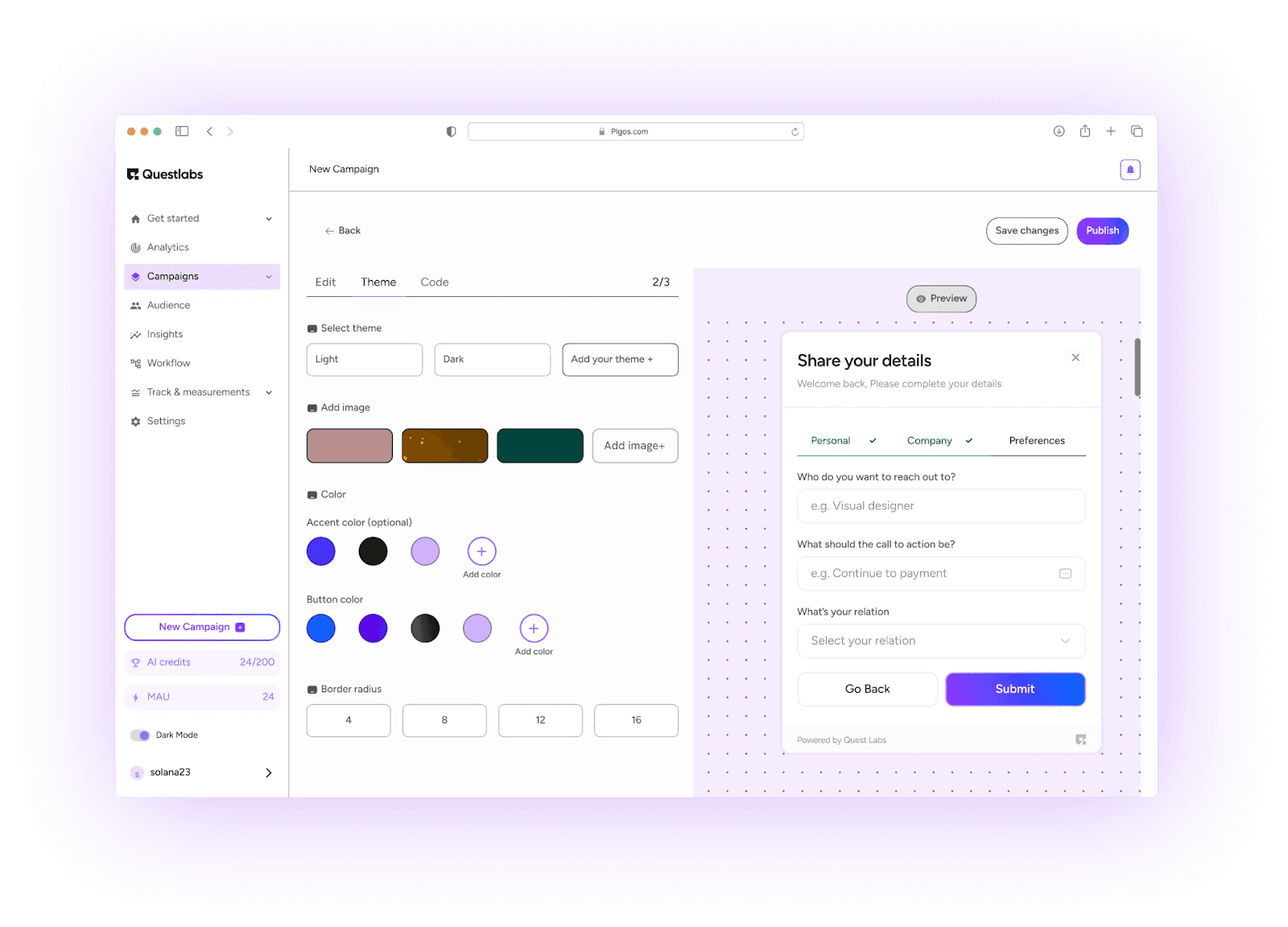
In-app onboarding tools like task lists, walkthroughs, and tooltips help guide users through the product intuitively. This not only shortens the learning curve but also caters to users with varying tech skills. Tools like PLG OS provide interactive experiences that reduce user drop-offs by delivering onboarding inside the product interface.
5. Keep Tasks Simple and Role-Specific
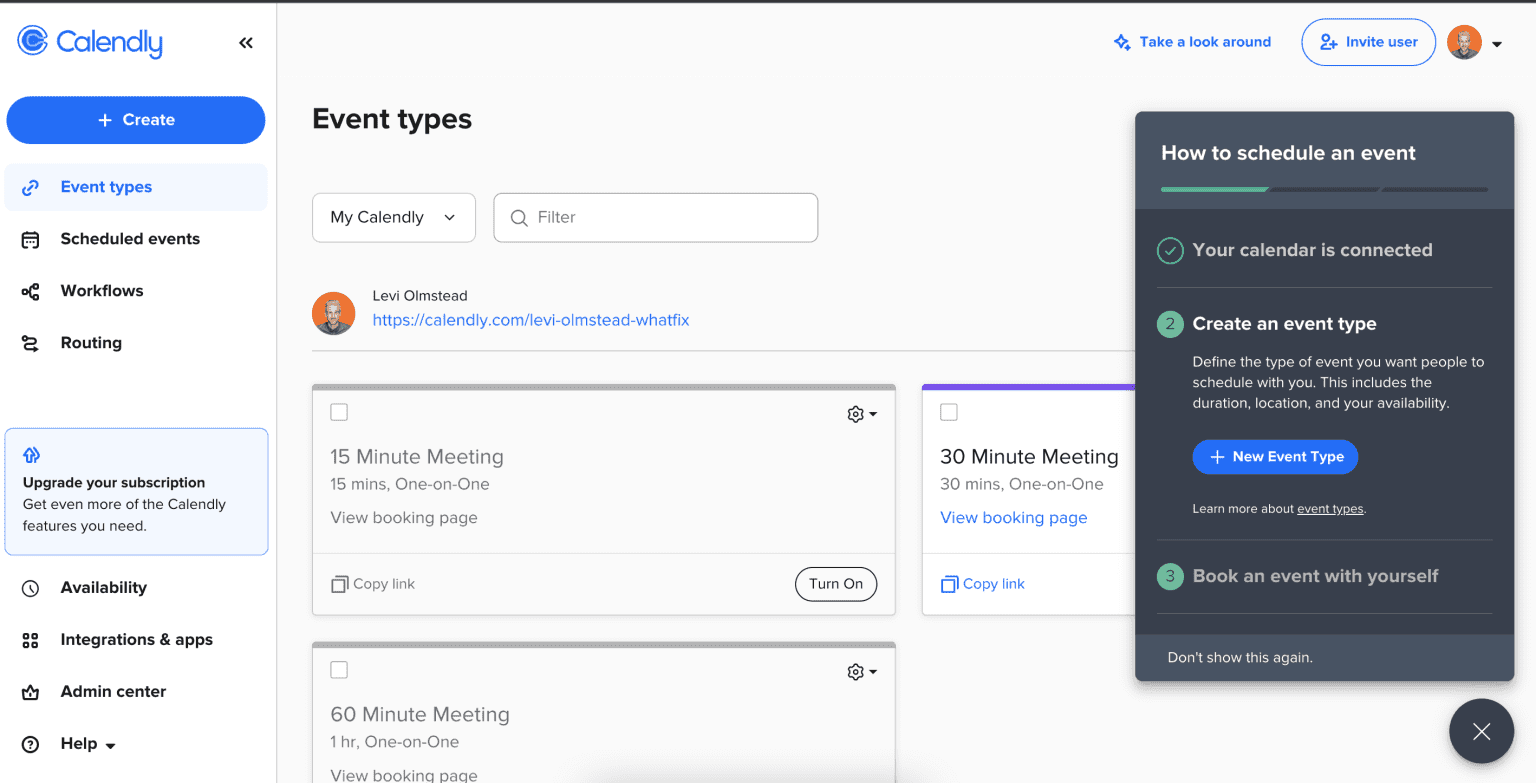
Avoid overwhelming users. Break down onboarding into small, clear, and role-relevant actions. Generic onboarding flows fail to highlight key “aha!” moments. Calendly is a great example new users are prompted to set up their calendar and create a shareable event link, immediately showcasing value.
6. Use Clear, Concise Language
Your onboarding copy should be brief and actionable. Avoid jargon and long explanations. Use verbs like “Create,” “Upload,” or “Invite” to drive action. The best checklists keep instructions under six words and highlight the benefit of each task, helping users focus and act quickly.
Wrapping It Up: Checklists Are Quietly Powerful
Checklists might not be flashy. They’re not shiny new AI features or viral growth hacks. But they work. Quietly, reliably, and repeatedly.
They:
- Remove friction
- Drive engagement
- Teach without overwhelming
- Build habits
- And most importantly, convert trial users into lifelong customers
In a world where product-led growth onboarding is the strategy of choice, checklists are the engine under the hood. And platforms like PLG OS make it easier than ever to deploy these user onboarding checklists with intelligence, automation, and data-driven precision.
If you're building a SaaS product and want to improve onboarding, reduce churn, and increase activation, start with your checklist.
Make it simple. Make it smart. Make it personal.
And then watch what happens when users feel like they know exactly what to do next.
FAQs
1. What is SaaS user onboarding?
SaaS user onboarding is the process of guiding new users to quickly understand and get value from your software.
2. Why is onboarding important in SaaS?
It helps reduce churn, improves product adoption, and drives users toward meaningful engagement and retention.
3. What is an “aha!” moment?
It’s the point when a user first realizes the core value of your product — a key step toward becoming an active user.
4. How long should onboarding take?
Ideally, onboarding should be quick and task-focused — most users expect to see value within minutes.
5. What makes onboarding effective?
Personalized tasks, clear language, in-app guidance, and a focus on user goals and context.