10 In-App Messages That Skyrocket User Activation Rates
Struggling to turn new signups into active users? You’re not alone. The secret to better activation rates isn’t more features — it’s smarter onboarding. In-app messages are your silent salespeople, guiding users to that all-important "aha" moment where your product clicks. Whether it's a welcome nudge, a tooltip at the right time, or a milestone celebration, these messages create momentum. In this post, we’re breaking down 10 in-app messages with real SaaS brand examples that turn casual users into loyal power users. If you want activation that sticks, this is where you start. Let’s dive in.
What is in-app messaging?
In-app messages are tailored messages that can be used to welcome customers, keep them engaged throughout their customer experience, and increase engagement by promoting new features. Not only did the number of brands using in-app messaging swell, but the number of sends increased by 793%, according to our State of Messaging Report.
They can also be used to make feature announcements, promote limited-time deals, or guide users through new capabilities they are unfamiliar with.
What's the distinction between in-app messaging and push notifications?
People frequently use in-app messages and push notifications interchangeably because both entail sending messages to users. However, they differ in terms of goal and location. Push notifications appear while the user is outside the app, whereas in-app communications display within the app itself. Users receiving in-app messages have 131% higher engagement rates than those who don't.
In-app vs push notifications
They also serve various objectives, as push notifications are typically used to engage users who aren't actively using the app, whereas in-app messaging assists users when they encounter complicated features during the onboarding process.
In short, the in-app messaging strategy helps users learn, whereas push notifications encourage users to return to the app by informing them about their account activity.
Why is in-app messaging important?
In-app messages enhance engagement and make the onboarding process go much more smoothly, but they are useful for more than just that. Here are a few advantages that in-app messages can provide when they notify users:
- Improve client lifetime value and achieve a healthy LTV:CAC ratio.
- Increase app usage
- Increase app retention rates.
It's also worth mentioning that in-app messages can be triggered by any trigger, behavior, or segmentation rule, making them excellent for contextual onboarding. This makes in-app communications an effective tool for targeting a certain user segment or pushing a premium feature.
What is User Activation, and Why Should You Care?
Before we jump into the messages, let’s understand why user activation matters.
User activation is the moment your user first experiences real value from your product. In other words, it's the "aha!" moment that makes them think, "Yes, this is what I needed!"
Users will abandon your app if they never reach that point, thereby wasting all your marketing and acquisition efforts.
That’s why product-led companies obsess over user activation. Because once users see the value, they're more likely to stick around, upgrade, and refer others. In-app messages with calls to action (CTAs) can achieve high CTRs, with some studies showing CTRs exceeding 30%.
10 In-App Messages Examples
1. Welcome Message With a Purpose
Instead of a generic “Welcome to our app!”, give users something actionable.
Example:
“Welcome, Priya! Ready to schedule your first campaign? Let’s walk through it step by step.”
This kind of message immediately anchors the user to a next step, not just a greeting.
Why it works: It’s warm, personalized, and leads directly into activation.
2. Onboarding Checklist With Progress Tracker
Users love knowing where they stand.
Introduce a checklist like:
"Complete these 3 steps to launch your first campaign:
- Connect your account
- Import data
- Launch test campaign"
Bonus: Add a progress bar. The sense of completion boosts motivation.
Why it works: It introduces small wins early on and gives users a clear direction
3. First-Action Tooltip
Show a tooltip the moment the user lands on a feature that matters.
Example:
“Click here to upload your first design—it takes less than a minute!”
Tooltips that appear contextually (when users hover or enter a page) feel natural and helpful.
Why it works: It reduces friction by simplifying first-time interactions.
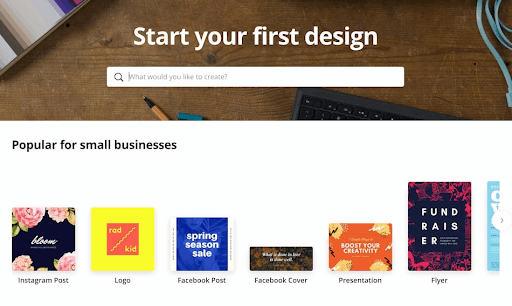
Example: Canva
When you land on Canva for the first time, tooltips gently guide you:
“Click here to start your first design.”
4. Time-Sensitive Prompt
Use urgency in the first session or trial period.
Example:
“Complete your first integration in the next 30 minutes to unlock premium analytics for free.”
This triggers the user's FOMO, and motivates immediate action.
Why it works: It adds a layer of excitement to the experience.
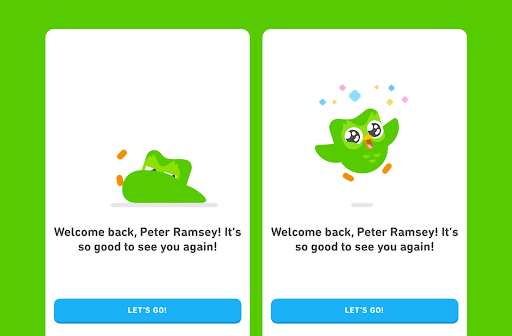
Example: Duolingo
Duolingo nudges new users with:
“Earn a 2X XP boost if you complete your first lesson now!”
5. “You Did It!” Milestone Message
Don’t wait until the end of onboarding to celebrate.
Trigger this after a key action:
“Nice work! You’ve connected your first data source. You’re halfway there.”
Why it works: Reinforcement is a powerful behavior driver. It builds confidence.
Pro tip: Inside PLG OS, you can define what milestones matter most and track completion rates.
6. Embedded Video Explainers
Some users just want to see how things work.
An in-app message that says:
“Not sure where to start? Watch this 60-second walkthrough.”
can increase activation dramatically.
Why it works: Visual learners get immediate clarity, reducing their time-to-value.
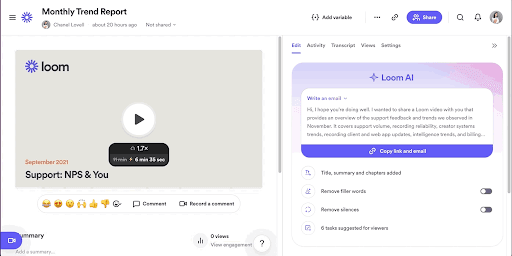
Example: Loom
Loom displays a short video right after sign-up:
“Here’s how to record your first video in under 60 seconds.”
7. Proactive “Need Help?” Prompt
A floating message like:
“Stuck somewhere? Our onboarding specialists are here to help. Chat with us.”
can reduce drop-offs significantly.
Why it works: It shows you care before the user asks for support.
In PLG OS, these can be triggered based on inactivity, giving just-in-time support.
8. Feature Highlight Based on Role or Persona
Not all users care about the same features.
Send a contextual nudge like:
“As a project manager, you’ll love our Gantt view. Want a quick tour?”
Why it works: Personalization increases relevance—and relevance increases action.
9. Social Proof Message
Validation drives confidence.
For instance:
“Over 4,000 startups use this feature to launch their MVPs. Try it now.”
Seeing others succeed with your product increases user trust.
Why it works: It taps into our natural tendency to follow what others are doing.
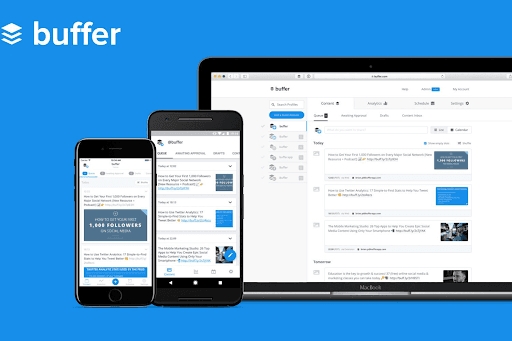
Example: Buffer
Buffer displays a contextual message like:
“Over 75,000 businesses schedule content using Buffer. Start with your first post.”
Empty State Call-to-Action
An empty dashboard is a missed opportunity.
Instead, show a message like:
“No campaigns yet? Start with this ready-made template—it only takes 2 clicks.”
Why it works: It converts a confusing blank page into an invitation to act.
Conclusion
Whether you're looking to onboard new users, improve feature use, or make a feature announcement, an in-app message can be incredibly beneficial.
After all, in-app messages are an excellent example of how to improve the user experience by adopting a conversational approach and delving deeper into providing the right aid at the appropriate moment. If you want to start reaping the benefits of in-app messages, collecting user feedback, and upselling customers to increase income, schedule a PLG OS demo today!
FAQs
1. What is an in-app message in SaaS?
An in-app message is a contextual notification or prompt shown to users while they’re using your app, designed to guide them, highlight features, or encourage specific actions.
2. How do in-app messages help improve user activation?
They reduce friction by guiding users to key actions, educating them on value, and motivating progress—turning new users into active ones faster.
3. What’s the difference between onboarding and activation?
Onboarding is the initial process of familiarizing users with your product. Activation happens when users achieve their first meaningful success or "aha" moment with your product.
4. How does PLG OS support in-app messaging?
PLG OS enables you to map user journeys, segment users by behavior or persona, and trigger personalized in-app messages to improve activation and retention rates.
5. Can I use these strategies in a B2B SaaS product?
Absolutely. In-app messaging is even more crucial in B2B SaaS, where onboarding complexity is higher and role-based guidance can significantly boost activation and product adoption.