7 Ways to Personalize Onboarding and In-App Feedback
The quick answer
Quick answer: personalized onboarding means the first-run experience changes with who the user is (role, goal, plan) and what they have already done, instead of every signup getting the same tour. Personalized feedback is the other half: ask each new user one short, relevant question at a natural pause, then answer with a next step that fits what they told you. The seven ways below cover both, starting with the cheapest (one role question at signup) and ending with a feedback loop that keeps adjusting the path.
Onboarding is your golden opportunity to make a lasting impression—whether it’s welcoming new users to your product or bringing fresh talent into your team. But a cookie-cutter, one-size-fits-all approach? That’s a recipe for disengagement and drop-offs. The future is all about personalized onboarding—tailoring every step to meet unique needs, roles, and motivations. In this blog, we’re breaking down 7 innovative ways to customize your onboarding experience that will boost engagement, accelerate success, and make every new user or hire feel truly valued from day one. Ready to transform your onboarding game? Let’s dive in!
What is User Onboarding?
User onboarding is the process of guiding new customers—or new employees—through the first interactions with your product, service, or organization. It’s more than a welcome message or a checklist. Done well, user onboarding:
- Demonstrates value early and often
- Reduces friction in learning and adoption
- Builds confidence in using the product or fulfilling the role
- Encourages long-term engagement and loyalty
Think of it as the bridge between a new user’s initial curiosity and their eventual “I can’t imagine working without this.” Whether for employee onboarding or digital user onboarding, the process sets the tone for the entire relationship.
Benefits of Personalized User Onboarding
Generic onboarding might check the boxes, but it rarely inspires action or retention. Personalized onboarding transforms the experience into something relevant, human, and motivating. In Shep Hyken's 2024 customer service study, 81% of customers said they prefer companies that offer a personalized experience, and onboarding is the first place a new user notices whether you know who they are.
Here’s why it matters:
1. Faster Time-to-Value (TTV)
When onboarding content is tailored to a user’s goals, they hit milestones sooner—and see the product’s or role’s value faster.
2. Higher Engagement
People pay attention when the information is relevant. Personalization keeps users focused and curious, not bored or overwhelmed.
3. Reduced Drop-Off
A one-size-fits-all onboarding often loses people along the way. Customized paths help prevent abandonment by removing irrelevant steps.
4. Improved Retention Rates
The more a user feels seen and supported, the more likely they are to stay. Personalized onboarding helps build trust from day one.
5. Stronger Advocacy
When people feel their journey was tailored to them, they’re more likely to recommend the product or company to others.
7 Ways to Personalize Your Onboarding Experience
1. Role-Based Onboarding Personalization
Not everyone starts at the same level. Your users—or new hires—bring different backgrounds, goals, and familiarity with your product or company. That's where role-based onboarding personalization shines.
Think beyond basic segmentation. For instance, ask a new team member: “Are you joining as a developer, marketer, or product manager?” Instantly, adapt the journey: developers get code-based walkthroughs; marketers see campaign templates. Similarly, in user onboarding, customers receive tailored in-app tours based on whether they're power users, novices, or migrating from another product.
In PLG OS, the onboarding quiz component asks new users who they are and what they came for, and the onboarding module lets you run different flows for different users. Before you build branches, decide which roles genuinely need a different first step: our role-based onboarding branch specification keeps the branch count to the few you can actually maintain.
2. Persona-Driven Journeys
A level deeper than roles, personas capture real-world motivations: Are users value-driven? Time-pressed? Visually oriented? Each needs a different flavor of onboarding.
Create parallel onboarding tracks:
- The “Fast-Track Achiever” gets a 3-step checklist to key features.
- The “Visual Learner” receives guided modals with GIFs or live previews.
- The “Inquisitive Explorer” is offered optional deeper dives and tooltips.
This persona-driven approach ensures that employee onboarding and user onboarding feel individually curated, increasing engagement and shortening time-to-value.
In PLG OS, the onboarding quiz collects the signup input, and on the Growth plan custom events, attributes and audience segmentation let you target flows by behavior as well. Keep the quiz short: a question belongs at signup only if its answer changes what the user sees next, which is the test in our progressive profiling question-selection worksheet.
3. Adaptive Checklists
Static checklists are helpful—but predictable. Why not make your onboarding adapt based on user progress and behavior?
Start with a structured checklist that evolves:
- If a user skips a step, the next action becomes more concise.
- Struggling with a complex feature? Your checklist shifts to include a quick tutorial—no human needed.
This adaptive checklist approach, powered by real-time user data, offers personalization in the onboarding process exactly when it's needed.
PLG OS pairs campaign analytics with A/B testing, and flow copy can be changed from its no-code dashboard, so you can adjust a checklist without a release.
4. Emergent Aha! Moments
Forget the one-and-done "aha" moment. Great onboarding creates multiple “aha! moments”—small insights that add up.
Design your onboarding to surface small wins:
- A welcome modal might say, “You’ve already added your first item—huge step!”
- Next, a tooltip highlights an advanced feature contextually when the user initializes a task.
- Then, a celebratory modal acknowledges a milestone (e.g., “You’ve completed 50% of setup—you're doing great!”)
This layered approach keeps morale and engagement high throughout the process.
PLG OS has modal, in-app banner and embedded onboarding tip components for these moments, and on the Growth plan you can target them to audience segments.
5. Embedded Social Proof
Onboarding doesn't occur in a vacuum. Build trust and motivation with real-world proof points:
- Show a number from your own data, such as how many teams in the user's industry turned a feature on in their first week. Only use figures you can back up.
- Include a testimonial: “As a Product Manager, I streamlined my workflow within an hour.”
- Trigger survey widgets mid-flow to capture feedback or sentiment, then deliver tailored follow-up assistance.
PLG OS offers NPS and satisfaction survey components that you can configure from its no-code dashboard and embed directly in your user journey, capturing feedback when it matters most.
6. Interactive Role-Based Risk-Free Sandbox
Imagine if every new hire or user could play with your product risk-free—like a real sandbox experience.
Set up an interactive simulation where:
- Users explore core workflows in a controlled environment.
- They can try first actions with tooltips and real-time guidance.
- At the end, they can commit changes for onboarding recognition—or reset if needed.
This is customizing onboarding for new hires and users alike: people get to explore without worrying about breaking anything.
PLG OS covers the guidance layer here, with walkthrough and quiz components. The sandbox itself (demo data and a workspace that can be reset) is something your own product has to provide.
7. Continuous Personalization via Feedback and Behavior
Onboarding shouldn’t be static. Your users evolve—and your onboarding should too.
Activate a feedback loop:
- Drop in-app surveys at key checkpoints
- Observe behavior: did they skip feature X or linger on setup Y?
- Use that intelligence to tweak onboarding paths automatically (e.g. trigger a tutorial for skipped features).
This ensures personalization in onboarding isn’t a one-time trick but a living, evolving experience.
In PLG OS, in-app surveys and the feedback workflow capture what users tell you, custom events (Growth plan) capture what they do, and A/B testing lets you compare the old path with the new one.
The seven ways side by side
Start at the top of this table and work down: the first rows need one question and a few flows, the last ones need event data and someone who owns the loop.
| Way | What changes for the user | Data you need | Effort |
|---|---|---|---|
| Role-based paths | First steps match their job | One role question or an invite signal | Low |
| Persona-driven journeys | Pace and format of guidance | Goal or motivation answer | Medium |
| Adaptive checklists | Checklist reorders as they progress | Completion events for each step | Medium |
| Layered aha moments | Small wins acknowledged in context | Milestone events | Low |
| Embedded social proof | Proof from people like them | Your own usage figures and testimonials | Low |
| Risk-free sandbox | Safe place to try core workflows | Demo data and a reset path in your product | High |
| Feedback and behavior loop | Path keeps adjusting after day one | Survey answers plus behavior events | Medium |
Personalized feedback during onboarding
Feedback in onboarding runs in two directions. You ask the new user how it is going, and you answer them in a way that reflects what they said. Plenty of teams do the first half and skip the second, and users soon learn that answering changes nothing.
- Ask the right person. Only ask about a step the user has actually finished. Asking someone who has not activated yet measures your signup form, not your product.
- Ask at a natural pause. Right after a task is done, never mid-flow and never on login. One question beats five.
- Answer in kind. A low score or “I'm stuck” should open help for the exact screen they are on. A feature request should get an acknowledgement. A happy user should be pointed at the next feature worth trying.
- Respect the dismissal. If they close the prompt, don't show it again tomorrow. A cooldown that follows the user across sessions and devices is part of the personalization.
The same rules work for employee onboarding: ask a new hire about a task they have just done, and let their answer change what their manager or buddy covers next. For in-app surveys, our in-app NPS eligibility and cooldown worksheet sets the eligibility floor, timing and cooldowns before anything ships. In PLG OS, the inline feedback and feedback workflow components handle the asking; the answering is a routing decision you make per reply.
Sample Onboarding Flow with PLG OS
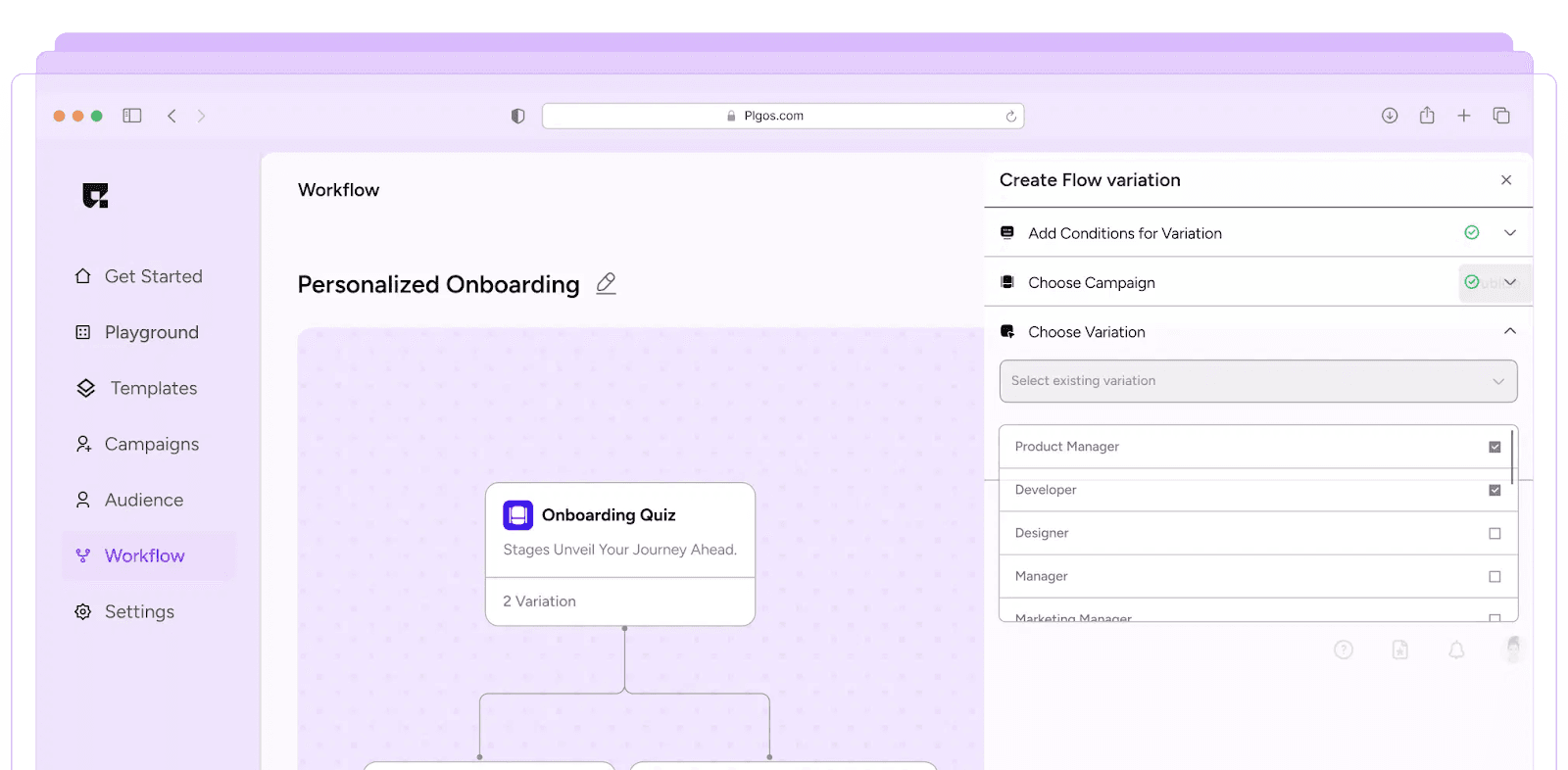
A personalized onboarding experience that doesn't get in the way is what drives user success. Here's a quick guide to an ideal onboarding flow with PLG OS, ensuring efficiency and engagement.
1. Welcome and Introduction
- Personalized Welcome Email: Send a customized email from your email tool welcoming the user or employee, introducing them to the platform, and outlining the first steps.
- User/Employee Segmentation: Tailor the email content based on their role, industry, or experience level.
2. Guided Product Tour or Introduction
- Interactive Walkthrough: Use PLG OS to create a step-by-step guide through the core features and user interface
- In-App Tooltips: Provide contextual tips to highlight important features during the initial navigation.
3. Role-Based Personalization
- Custom Onboarding Paths: For user onboarding, offer paths based on their use case (e.g., beginner vs. expert). For employee onboarding, segment by role (e.g., developer, HR).
- Tailored Content: Provide relevant articles, tutorials, or training material.
4. Progress Tracking and Milestones
- Onboarding Progress Bar: Show completion percentage to keep users motivated and engaged.
- Set Milestones: PLG OS can track key actions like profile setup, feature adoption, and initial usage.
5. Feedback and Support
- In-App Feedback: Collect feedback through surveys or thumbs-up/down features to continuously improve the onboarding experience.
- Support Integration: Provide easy access to FAQs, live chat, or a help center for quick resolutions.
6. Completion and Continuous Engagement
- Post-Onboarding Checklist: After finishing the onboarding, offer a personalized checklist to reinforce important tasks.
- Ongoing Engagement: Use PLG OS announcement banners and the Help Hub's updates feed for product updates and feature highlights that keep users engaged long-term.
The Power of Customization in Onboarding
Moving user onboarding and employee onboarding from generic to customized isn’t just good design—it’s a strategic differentiator. By investing in:
- Role-based personalization
- Persona-specific paths
- Adaptive checklists
- Multi-step “aha” layering
- Embedded social proof
- Interactive sandboxing
- Continuous behavioral feedback
You create an onboarding experience that feels tailor-made and thoughtful, and that gives people the confidence to explore.
PLG OS can carry most of that layer from one SDK: walkthroughs, onboarding quizzes, surveys, tips, A/B testing and analytics. If you are still choosing a platform, our roundup of the best user onboarding software for SaaS startups compares the main options.
Final Thoughts
Personalized onboarding isn’t an add-on—it’s a mindset. When users and new hires feel seen, supported, and recognized, they engage faster, stick longer, and become ambassadors of your brand.
Start imagining onboarding as a dynamic conversation, not a one-size-fits-all manual. Layer in the seven strategies above, starting with the cheapest. PLG OS is one way to ship them without building every component yourself. Your users—and your metrics—will thank you.
FAQS
Q1: What is personalized onboarding?
Personalized onboarding tailors the onboarding experience to each user's role, needs, and preferences, making the process more relevant and effective. In practice, different users see different first steps, tips and checklists instead of one generic product tour.
Q2: How do you give personalized feedback during onboarding?
Ask one short question at a natural pause, such as right after a user finishes a setup step, and only ask users who have actually done that step. Then answer with a next step that matches their reply: a stuck user gets help, a user asking for a missing feature gets told it is logged, and a satisfied user gets pointed at the next feature worth trying.
Q3: How does role-based onboarding work?
Users or employees are grouped by their roles, and each group receives customized onboarding content specific to their responsibilities and skills. The role usually comes from one question at signup or from a signal such as the invite that brought them in, and roles that share the same first action should share a path.
Q4: Can onboarding be personalized without coding?
Mostly. Onboarding platforms such as Userpilot, Appcues and PLG OS let non-engineers edit flows, targeting and copy from a dashboard, but each needs a one-time snippet or SDK install by a developer before that works.
Q5: How do I measure onboarding success?
Track metrics like user activation rates, feature adoption, time-to-value, and satisfaction surveys to assess effectiveness. Compare users who went through a personalized path with eligible users who did not, because completion rate on its own mostly tells you who was already motivated.