Top 10 No-Code Tips for Building Onboarding Flows with PLG OS
Onboarding can either be a smooth ride that gets your users to say “This is exactly what I needed,” or a confusing journey that ends with an unsubscribe. And in the product-led world, that first experience matters—a lot.
But here’s the good news today: you don’t need a room full of engineers to build a practical onboarding experience. No-code platforms like PLG OS have made it incredibly simple to design, launch, and optimize onboarding flows that actually drive activation and retention.
Let’s see the Top 10 No-Code Tips to help you create stellar onboarding experiences using PLG OS. Whether you’re launching a new product, improving a SaaS experience, or experimenting with growth loops, these tips will give you a serious head start.
Let’s get into it.
What is No-Code Onboarding?
No-code onboarding is the process of creating a comprehensive onboarding experience with technologies that do not require the use of any code. It mainly entails creating in-app experiences like modals, tooltips, and checklists with drag-and-drop builders.
Most firms prefer to employ no-code onboarding platforms rather than creating their own onboarding experience. It's simpler, less expensive, and doesn't require the assistance of a developer.
How No-Code User Onboarding Tools Improve Customer Onboarding:
Faster Launch:
Build and deploy onboarding flows quickly—no developer needed.
Drag-and-Drop Simplicity:
Anyone on the team can design intuitive user journeys.
Real-Time Iteration:
Make updates on the fly based on user feedback or data.
Personalized Flows:
Easily segment and tailor experiences for different user types.
Behavior-Based Triggers:
Show the right message at the right moment automatically.
Reduced Developer Dependency:
Free up engineering teams for core product work.
Better User Engagement:
Tooltips, checklists, and guides drive faster activation.
Built-in Analytics:
Track drop-offs, completions, and optimize what works.
Scalable:
Easily adapt and expand onboarding as your product grows.
A/B Testing Ready:
Test different flows and discover what drives better conversions.
No-code tools empower product, growth, and success teams to own onboarding, resulting in smoother user experiences, faster time-to-value, and improved retention.
10 Tips for Building No-Code Onboarding Flows
1. Start With One Goal in Mind: Activation
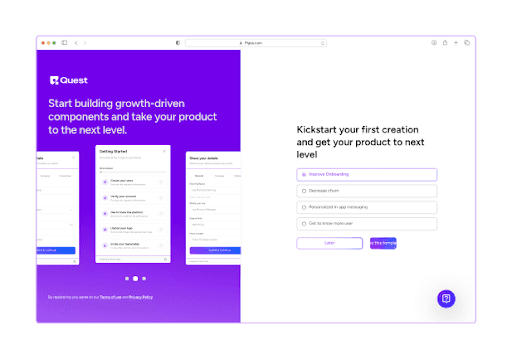
Before you build a single step in your onboarding flow, ask yourself this: What action defines an “activated” user for your product?
Is it connecting their calendar? Inviting a teammate? Publishing a document?
Once you define this “aha” moment, everything in your onboarding should guide users toward it. In PLG OS, you can easily map out your onboarding milestones and track how users move through each one.
By narrowing your focus to one clear goal, your onboarding flow becomes less about showing features and more about showing value.
2. Use the PLG OS Visual Builder to Prototype Fast
Time is everything in product-led growth. PLG OS comes with a clean, intuitive drag-and-drop builder that lets you design interactive onboarding flows without a single line of code.
Instead of waiting on design sprints or dev cycles, your product managers, marketers, or growth teams can spin up experiments quickly.
Pro tip: Don’t wait for perfect. Use the visual builder to create MVP onboarding flows, push them live, and iterate based on feedback. You’ll learn more from real user data than internal assumptions.
3. Context Is Everything: Trigger Onboarding at the Right Time
Not every user needs the same onboarding at the same time. Someone logging in for the first time doesn’t need advanced tips—they need clarity and quick wins.
That’s where event-based triggers in PLG OS shine.
You can set your flows to launch based on user behavior. If someone visits your dashboard for the first time, show them a walkthrough. If they’ve created a project but haven’t shared it, trigger a nudge.
Smart, personalized onboarding beats one-size-fits-all every time.
4. Break It Down: Keep Steps Micro and Actionable
Your user’s attention is short. And if onboarding feels like homework, they’ll bounce.
Instead of showing users a long, linear tour with 10+ steps, break the flow into bite-sized interactions. Let them discover features as they need them.
PLG OS supports progressive disclosure, meaning you can only show specific onboarding prompts when they become relevant.
For example, show how to add integrations only after the user has finished their initial setup.
Less noise. More relevance.
5. Use Checklists to Create Momentum
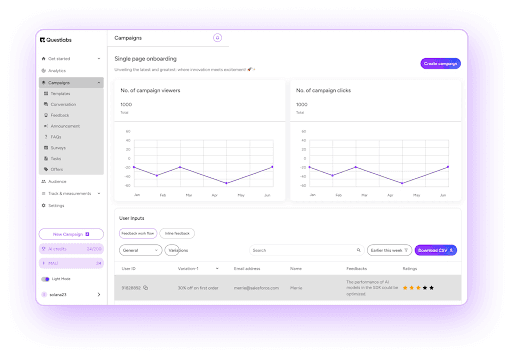
Checklists are more than just to-do lists—they’re psychological nudges that create a sense of progress. And progress feels like a reward.
Using PLG OS, you can build interactive checklists that highlight critical tasks like:
- Set up profile
- Add team members
- Create first project
- Share your first file
As users complete items, the sense of achievement builds. You can even trigger small rewards—like confetti or badges—to make it more delightful.
The key? Make the checklist feel doable. Aim for 3–5 quick wins right out of the gate.
6. Use Tooltips and Guides to Support, Not Distract
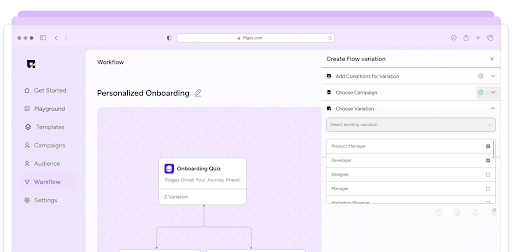
Nobody likes popups that hijack their experience. But well-timed, helpful tooltips? That’s gold.
With PLG OS, you can set up contextual tooltips that guide users through specific actions without overwhelming them.
Let’s say your user is hovering near a button they haven’t clicked before. You can gently suggest, “Try this to publish your first task.”
Don’t explain every feature at once. Let users learn by doing, with just the right nudge at the right time.
7. Segment Your Onboarding for Different Personas
Not every user is starting from the same place. Your onboarding shouldn’t treat them all the same.
Use PLG OS’s segmentation features to tailor onboarding flows based on user type.
For example:
- First-time users get a full guided tour
- Power users get shortcuts to advanced features
- Admins get access to team management tools
The more personalized your onboarding feels, the faster users will reach value. And personalization is one of the biggest drivers of retention.
8. Embed Feedback Loops to Keep Improving
Your onboarding is never really “done.” User needs change. Product features evolve. And you’ll always find ways to improve.
That’s why it’s smart to embed feedback prompts directly into your onboarding using PLG OS.
You can ask questions like:
- “Was this guide helpful?”
- “What were you trying to do here?”
- “How can we make this setup easier?"
Even better—use in-flow analytics to track drop-off points. If most users abandon step 3 of your setup, you’ll know exactly where to fix it.
9. A/B Test Your Onboarding Flows Like a Scientist
One onboarding flow doesn’t fit all. That’s why experimentation is key.
PLG OS lets you run A/B tests to compare different onboarding variants. You can test:
- Long form vs. short form
- Checklist vs. tooltip-based onboarding
- Video tutorials vs. text-based guides
- Different CTAs or value propositions
And the best part? You don’t need to involve engineering. With a few clicks, you can set up your experiment, launch it, and track what moves the needle.
This is product-led growth in action.
10. Celebrate Success and Reinforce Value
Onboarding shouldn't end with the last tooltip. You need to close the loop and make users feel like they’ve accomplished something.
With PLG OS, you can trigger celebration modals or in-app success messages when users hit major milestones.
“Congrats! You’ve completed your setup.” “Way to go! Your first campaign is live.”
You can also use this moment to guide users to the next step in their journey—like inviting teammates, exploring integrations, or upgrading to premium.
This final nudge not only feels good, but it sets the stage for long-term engagement.
Why Use PLG OS to Build Your Onboarding Flow?
PLG OS is purpose-built for product-led companies. It’s designed to help you build, optimize, and scale onboarding experiences without coding or relying heavily on engineering resources.
Here’s what makes it stand out:
Visual builder:
Anyone on your team can use it
Behavioral triggers:
Show the right message at the right time
Segmentation:
Personalize based on user type or behavior
Analytics:
Measure success and identify friction
A/B Testing:
Find the best-performing flow with data
Speed:
Iterate faster and launch without delays
In short, the OS empowers your team to move at the speed of product-led growth. If you haven’t explored it yet, you can check out PLG OS to see how it can power up your onboarding.
Final Thoughts
User onboarding isn’t just a nice-to-have—it’s the front door of your product experience. And in a product-led growth strategy, it can make or break your success.
Tools like PLG OS make creating an engaging, effective, and scalable onboarding flow more accessible than ever. No code. No delays. Just real progress.
Whether you're launching your first onboarding or optimizing your tenth, keep these 10 tips in mind.
Remember: Great onboarding doesn’t feel like onboarding—it feels like progress.
So go ahead. Build the onboarding experience your users deserve.
FAQs
1. What are no-code onboarding tools?
They are platforms that let you build onboarding flows, like walkthroughs or tooltips, without writing code.
2. Who can use them?
Product managers, marketers, or customer success teams—no technical background needed.
3. Are they customizable?
Yes, most allow complete branding, user segmentation, and behavior-based personalization.
4. Can they track user progress?
Absolutely—built-in analytics show where users drop off and what’s working.
5. Do they scale with product changes?
Yes, they’re flexible and can be updated easily as your product evolves.