Onboarding Success Rate: Definition, calculation and strategies
In the world of SaaS, onboarding is not just a box to check off—it's a vital part of the customer journey that can make or break a company's long-term success. Think of onboarding as the crucial first step in a relationship; if you want to foster loyalty and retention, you need to set the stage for your customers to thrive. In this blog, we'll dive into the onboarding success rate, explore its importance, and provide actionable strategies for achieving and measuring it.
What is Onboarding Success Rate
So, what exactly is the onboarding success rate? Simply put, it's the percentage of new users who successfully complete your defined onboarding process and start to see value from your product. This metric isn't just a number; it's a key indicator of user activation and retention. If customers can't navigate the initial stages of your service, they're unlikely to stick around for the long haul.
Calculating Onboarding Success Rate
The formula for calculating your onboarding success rate is straightforward:
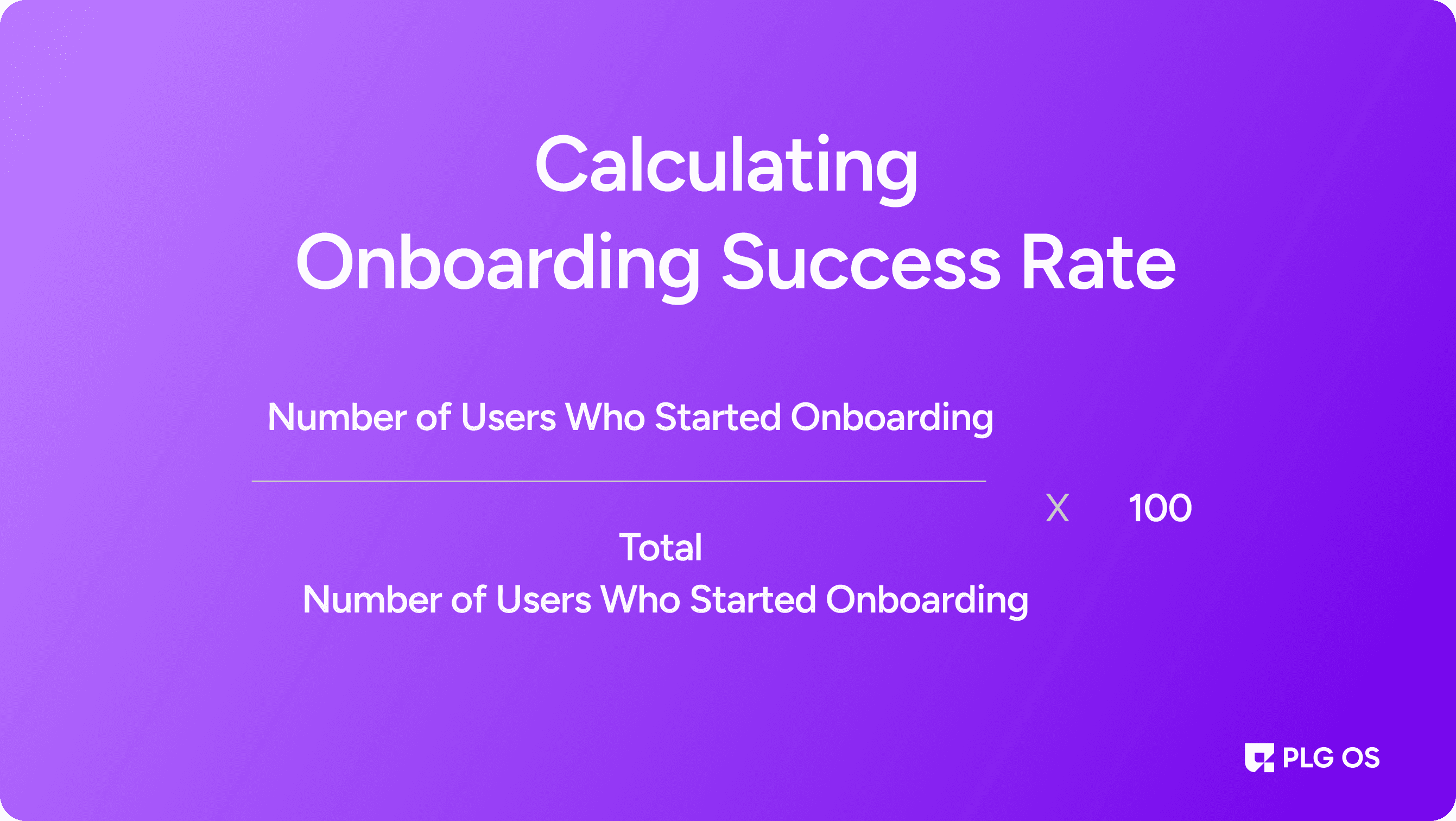
Onboarding Success Rate = (Number of Users Who Complete Onboarding / Total Number of New Users) x 100
However, defining "success" can be a bit more nuanced. It often involves hitting specific milestones that demonstrate a user has engaged meaningfully with your product. These could include completing a tutorial, using a key feature, or achieving their first meaningful outcome.
Why Onboarding Success Matters in SaaS
Impact on Business Metrics
Strong onboarding is crucial for a variety of business metrics, including:
Customer Lifetime Value (CLV):
Happy, engaged customers are more likely to stick around and spend more.
Time to First Value (TTFV):
Efficient onboarding reduces the time it takes for users to see the value of your product.
Customer Retention Rates:
A successful onboarding experience increases the likelihood that customers will stick around.
Product Adoption Rates:
Onboarding helps users understand your product, leading to increased adoption of its features.
Customer Satisfaction Scores:
A smooth onboarding process contributes to higher satisfaction ratings.
Expansion Revenue Potential:
Customers who see value are more likely to upgrade or recommend your product.
Cost Implications
Investing in effective onboarding can lead to significant cost savings by reducing:
Customer Support Costs:
Fewer questions and issues arise when users know how to use your product effectively.
Customer Success Resource Requirements:
A smooth onboarding experience can lighten the load for your customer success team.
Customer Acquisition Costs:
Improving retention rates can lower your overall acquisition costs.
Training and Documentation Needs:
Well-designed onboarding can lessen the need for extensive training materials.
Key Components of Successful Onboarding
Clear Value Demonstration
From the outset, your onboarding should showcase your product's core value. This involves:
Aha Moments:
Identifying key 'aha moments' where users realize the product's potential.
Value Paths:
Creating straightforward paths to value realization.
Immediate Benefits:
Highlighting immediate benefits and showing tangible results early.
Personalized User Journeys
Remember, one size does not fit all. Tailor the onboarding experience based on:
User Roles:
User roles and objectives.
Technical Expertise:
Varying levels of technical expertise.
Industry Requirements:
Industry-specific requirements and learning styles.
Progress Tracking
Milestone Tracking:
Milestone completion rates.
Time Analysis:
Time spent on each step.
Obstacle Identification:
Common drop-off points and obstacles users encounter.
Strategies for Improving Onboarding Success
Streamline the Initial Experience
Focus on minimizing friction in the early stages by:
Setup Optimization:
Reducing setup steps.
Process Automation:
Automating processes where possible.
Clear Instructions:
Providing clear, concise instructions.
Quick Wins:
Offering quick wins to boost confidence.
Implement Interactive Guidance
Product Tours:
Product tours that showcase features.
Contextual Help:
Contextual help that offers assistance where needed.
Video Tutorials:
Video tutorials for visual learners.
Progress Indicators:
Progress indicators to keep users motivated.
Provide Multiple Support Channels
In-app Support:
In-app guidance that offers immediate support.
Knowledge Base:
Knowledge base articles for self-help.
Live Assistance:
Live chat for real-time assistance.
Community Support:
Community forums where users can share experiences and tips.
Measuring Onboarding Effectiveness
Key Metrics to Track
Completion Time:
Time to complete onboarding: How long does it take for users to finish the process?
Feature Adoption:
Feature adoption rates: Are users engaging with the key features?
User Engagement:
User engagement levels: How frequently are users logging in after onboarding?
Support Volume:
Support ticket volume: Are users needing help frequently?
Retention:
Early user retention rates: Are users sticking around after onboarding?
Satisfaction:
User satisfaction scores: Are users satisfied with their onboarding experience?
Segmentation Analysis
User Types:
User types (e.g., new vs. returning users).
Industry Segments:
Industry segments.
Company Size:
Company sizes.
Geography:
Geographic regions.
Acquisition Source:
Acquisition channels (e.g., referral vs. paid advertising).
Common Onboarding Challenges and Solutions
Information Overload
Challenge:
Users often feel overwhelmed by too much information at once.
Solution:
Break onboarding into manageable chunks and utilize progressive disclosure—only showing users what they need to know when they need to know it.
Lack of Engagement
Challenge:
Users may lose interest before finishing the onboarding process.
Solution:
Gamify the onboarding experience and set clear value milestones to keep users motivated.
Technical Difficulties
Challenge:
Users may struggle with technical setups or integrations.
Solution:
Provide automated setup options and ensure technical support is readily available.
Best Practices for Onboarding Success
Clear Goal Setting
User Goals:
User activation and feature adoption.
Time Goals:
Value realization and time to complete onboarding.
Success Metrics:
Success metrics that you can track over time.
Continuous Optimization
User Feedback:
User feedback and completion rates.
Drop-off Analysis:
Drop-off points and support requests.
Success Patterns:
Success patterns you observe.
Multi-Channel Support
Documentation:
Documentation and video tutorials.
Live Support:
Live support options for immediate help.
Community Resources:
Community resources and training sessions.
The Role of Technology in Onboarding
Automation Tools
Leverage technology for:
Progress Tracking:
Tracking user progress through the onboarding process.
Automated Communication:
Sending automated notifications and reminders.
Personalized Guidance:
Providing personalized guidance based on user actions.
Performance Analytics:
Monitoring performance analytics for ongoing improvement.
Integration Capabilities
Ensure your onboarding process integrates smoothly with:
Existing Systems:
Existing workflows and third-party tools.
Data Systems:
Data migration systems and authentication processes.
Customer Platforms:
Customer data platforms for a comprehensive view of user interactions.
Future Trends in Onboarding
AI and Machine Learning
Emerging technologies will enable:
Predictive Guidance:
Predictive user guidance that adapts to individual needs.
Learning Paths:
Personalized learning paths based on user behavior.
Automated Support:
Automated troubleshooting and real-time support.
Behavior Analysis:
Behavior analysis that helps anticipate user needs.
Enhanced Personalization
As customization becomes increasingly important, focus on:
Role-Based Journeys:
Role-based onboarding journeys that cater to specific user types.
Industry Paths:
Industry-specific paths that address unique challenges.
Skill Adaptations:
Skill-level adaptations to accommodate varying degrees of familiarity with technology.
Goal Alignment:
Goal-based guidance that aligns with user objectives.
Creating an Onboarding Success Culture
Team Alignment
Ensure all departments understand:
Goals Understanding:
The goals and success metrics of the onboarding process.
Role Clarity:
Each team's responsibilities in facilitating onboarding.
Communication:
Effective communication channels for sharing insights and improvements.
Customer Focus
Maintain a strong emphasis on:
User Experience:
Enhancing user experience throughout onboarding.
Value Delivery:
Delivering value from the start to empower users.
Continuous Improvement:
Collecting feedback continuously to improve the onboarding process.
Conclusion
In SaaS, mastering onboarding success is foundational for building lasting customer relationships, and tools like PLG OS can make a significant difference in achieving this. Effective onboarding isn't just an introduction—it's about enabling users to experience your product's value as quickly and seamlessly as possible. By streamlining key onboarding elements, PLG OS helps SaaS companies drive meaningful user engagement, boost retention, and reduce churn.
With PLG OS, you gain access to customizable onboarding workflows that empower users from the start, including interactive product tours, tailored user journeys, and actionable insights through analytics. This tailored approach equips users with the tools they need while offering teams the data to continuously optimize their process. Leveraging PLG OS for onboarding means providing a consistent, value-driven experience that enhances user satisfaction and keeps pace with their evolving needs, setting the stage for a sustainable, growth-focused SaaS journey.