The Essential Guide to In-App Onboarding That Actually Works
Imagine downloading an app, opening it with excitement… and then staring blankly at the screen, not knowing what to do next.
You swipe here, tap there, and fumble around—and then uninstall it within five minutes.
Now flip the script.
You download the same app, open it, and instantly, a friendly welcome message appears. You're guided step-by-step, features are introduced smoothly, and in just a few taps, you’ve accomplished something useful.
That's the power of great in-app onboarding.
Whether you're building a product, managing growth, or improving user retention, onboarding is the bridge between “new user” and “happy, retained customer.”
In this guide, we’re diving deep into the world of in-app onboarding—what it is, why it matters, how to do it right, and the tools and strategies to make your onboarding experience stand out.
What is in-app onboarding?
Onboarding is best described as client education. You are training your user on how to get the most value out of your product.
Some of this schooling takes place outside of the app. Classic examples include:
- Social media content.
- Blog content.
- Landing page material includes testimonials.
- Conference meet up.
However, when we talk about in-app onboarding, we mean the user education that occurs within the app itself. This may include:
- A product tour that displays users the major features that fit their use case.
- A tooltip that exposes a typical mistake within your application.
- An in-app chat widget that connects users to support services, both human and automated.
Why Does In-App Onboarding Matter?
If you’re still on the fence, here are some clear reasons why onboarding isn’t optional—it’s essential.
1. Retention Starts on Day 1
A study by Localytics showed that 71% of users churn within 90 days. The first few minutes are critical. Onboarding helps show value fast before users leave.
2. Reduces Support Burden
A clear, intuitive onboarding process means fewer questions, less confusion, and a smaller support queue.
3. Boosts Engagement and Activation
When users understand the core features quickly, they start using them. This leads to faster activation, which drives long-term engagement.
4. Enhances UX and Brand Loyalty
First impressions last. A smooth onboarding experience sets the tone for how users perceive your product and your brand.
6 In-app Onboarding Process
You must first master the components of your user onboarding process in order to design an experience that recognizes user behavior and responds to how users engage with your onboarding flows.
1. An easier sign-up process
Most app users will not complete a cumbersome onboarding process without a little assistance. To better guide users and prevent overwhelming them, keep the signup process quick and seamless.
Stick with mobile app onboarding that just focuses on the most crucial elements consumers will need on day one:
- Highlighting the key value
- Setting essential permissions
- demonstrating major features
- Enabling rapid login/sign up
- Offering quick functionality
Non-essential procedures, such as email confirmations, should be delayed until after signup. Instead, focus on the critical components outlined above, as well as guaranteeing security using SSO or social logins for convenience.
2. Welcome screen
You may utilize a welcome screen to set the tone for the app experience and provide users with an easy path to understanding its purpose and benefits right away. To develop trust and prevent uncertainty, keep the messaging clear and entertaining, but remember that it should also be consistent with your brand.
Personalization is another important aspect of the app onboarding welcome screen. You could ask a few fast, relevant questions at this stage (for example, preferences, goals, or usage purpose) and adapt the information and features accordingly.
For instance, Pinterest asks new users to select their interests so the app's suggestions are relevant.
3. Interactive Walkthroughs
You can utilize interactive walkthroughs in mobile apps to help consumers learn by doing. Consider using tooltips, modals, or hotspots to provide non-intrusive, contextual guidance.
Tip: Concentrate on actions related to the users' core goals. To deliver immediate value, consider setting a task in a productivity app or making your first buy in a shopping app.
4. User Onboarding Checklists
Onboarding checklists give users with a clear, planned path to take the necessary first steps while tracking progress using a visual indicator. Including pre-completed processes, such as account setup, generates momentum and encourages consumers to keep engaged.
According to Nick Bouchard, founder of Word Merc Marketing,
"Every item on your checklist must be extremely relevant to the user, with the ultimate goal of leading them to that 'aha!' moment. It must be concise, actionable, and unambiguous."
5. Contextual advice
Provide assistance when users require it. Why? This is an easy technique to lessen frustration and give a smoother experience, which people may recall as pleasant.
Not sure where to begin? Use in-app messages to highlight features depending on user activity and guide them through the app at crucial points to improve usability and engagement.
6. Self-Service Support
Incorporate searchable knowledge bases, FAQs, or guided tutorials to allow users to handle difficulties on their own at any time. Include live chat or email support for more sophisticated issues.
6 Must-Have Features of a Great Onboarding Process (With Real Examples)
Designing a great product is only half the battle—getting users to adopt it successfully is where onboarding steps in. But not just any onboarding will do. It needs to be smart, helpful, and deeply aligned with what users want to achieve.
Let’s walk through the six must-have features of an effective in-app onboarding process, with real-world examples, including PLG OS.
1. A Clear and Immediate Path to Value (PTV)
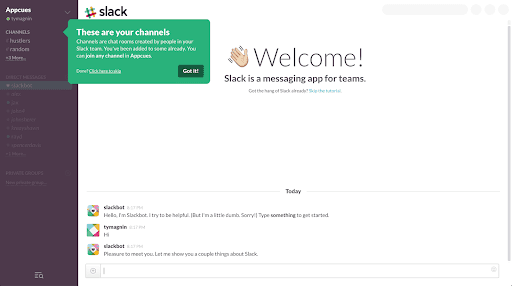
Your onboarding should answer one question right away: “How will this app help me right now?”
Instead of overloading users with all features, zero in on the action that delivers immediate, personal value.
Example: Slack
When you first sign up for Slack, it doesn’t ask you to tour every feature. It walks you through creating a workspace, sending your first message, and inviting teammates, right to the point.
Why it works: It connects users to a core value (communication) in under 5 minutes.
2. Interactive, Hands-On Guidance
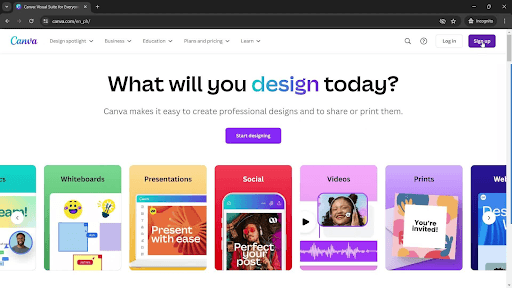
Users learn best by doing. An ideal onboarding experience gives users real-time cues in the actual interface rather than showing static instructions or boring walkthroughs.
Example: Canva
When a new user lands in Canva, tooltips guide them through creating their first design by pointing to tools, templates, and buttons in real time.
Why it works: It lets users interact and explore while learning, reducing friction.
3. Progressive Disclosure (Don’t Show Everything at Once)
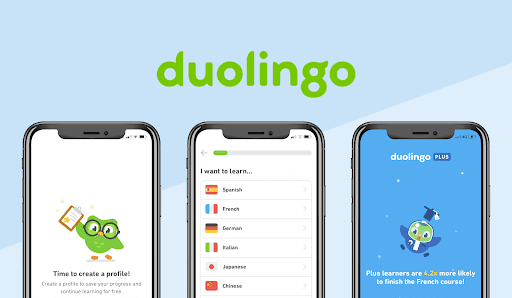
Instead of overwhelming users with a firehose of features, great onboarding reveals functionality based on user behavior. It’s all about just-in-time learning.
Example: Duolingo
When you start Duolingo, it doesn’t show you the entire platform. It eases you into a single lesson. As you progress, more features like streaks, crowns, or leaderboards are gradually unlocked.
Why it works: Users aren’t distracted by irrelevant info and feel in control of their learning journey.
4. Personalization Based on User Intent
A one-size-fits-all onboarding flow often leads to confusion. Instead, tailor onboarding to different use cases, goals, or industries.
Example: Notion
During onboarding, Notion asks: “What are you using Notion for?”—personal use, team collaboration, school, etc. Based on that answer, it presents a tailored interface and templates.
Why it works: It gives users a relevant experience from the start, increasing activation rates.
5. Built-in Feedback and Education Loops
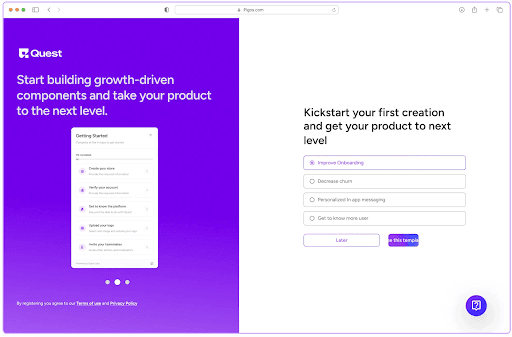
Great onboarding is a conversation, not a monologue. Providing a way for users to ask questions, revisit tips, or request help makes them feel supported, not stuck.
Example: PLG OS
PLG OS (Product-Led Growth Operating System) does this brilliantly. It offers in-app guidance with bite-sized checklists, practical templates, and guided playbooks for GTM teams. New users are onboarded using modular learning steps, and at each stage, they’re encouraged to:
- Apply real PLG strategies to their workflow
- Track progress via micro-goals
- Access help content contextual to their tasks
Why it works: It feels more like a co-pilot than a teacher. Users get help when they need it, without losing momentum.
6. Progress Tracking and Celebration Moments
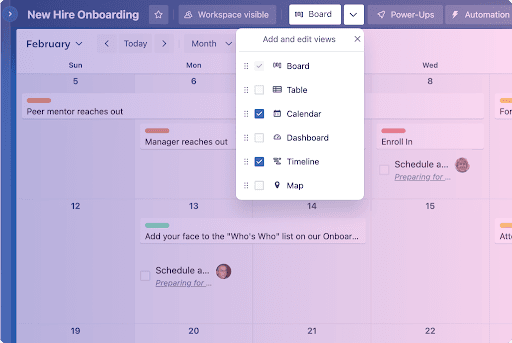
Nothing motivates a user like visible progress. A great onboarding process shows users how far they've come, what’s next, and celebrates milestones to create momentum.
Example: Trello
Trello uses checklists and animations to show progress as users complete setup tasks (like creating boards, inviting team members, or adding cards). A simple “You did it!” screen can spark satisfaction.
Why it works: Celebrating small wins creates emotional investment and keeps users moving forward.
Conclusion
In-app onboarding isn’t just about welcoming users—it’s about guiding them to their first success with clarity, relevance, and confidence. Each of these six features helps remove friction, boost engagement, and increase the likelihood that users stick around.
Tools like PLG OS provide a wealth of inspiration for implementing these elements with precision and purpose. Their approach to step-by-step value delivery is exactly what modern SaaS products need in today’s product-led world.
Need help mapping these features into your own onboarding flow? Book your call today!!
FAQs
1. What is in-app onboarding?
In-app onboarding is the process of guiding new users through your app's core features and value directly within the interface, helping them get started quickly and smoothly.
2. Why is onboarding so important?
A good onboarding experience increases user activation, reduces churn, and sets the stage for long-term engagement by showing users how to succeed with your product.
3. How long should onboarding take?
Ideally, users should reach their first "aha moment" within the first few minutes. Keep the flow short, actionable, and tailored to user intent.
4. Can onboarding be personalized?
Absolutely! Tailoring onboarding based on user role, goal, or behavior makes the experience more relevant and effective.
5. What tools can help create in-app onboarding?
Popular tools include Appcues, Userpilot, WalkMe, PLG OS, and Intercom, all offering customizable onboarding flows, tooltips, checklists, and analytics.