10 Best PLG Strategies to Scale SaaS User Assistance
If you’re running a SaaS company, you’ve probably noticed something: the old model of “launch product → wait for support tickets → hire more agents” doesn’t cut it anymore. Today’s users expect instant, contextual help—without leaving the app, without filling a ticket, and preferably without even realizing they needed “support” at all.
That’s where PLG (Product-Led Growth) comes in. And if you combine PLG principles with the right platform, you can create user assistance that scales, delights, and actually drives growth. Before we dive into the 10 best PLG strategies for SaaS, let’s align on what we mean by user assistance and PLG.
What Is User Assistance?
User assistance is the umbrella term for all the ways you help your users learn, troubleshoot, and succeed with your product. It goes beyond just “customer support” to include:
- In-app tooltips, guides, and walkthroughs
- Searchable help centers and FAQs
- Contextual documentation and videos
- Proactive alerts and notifications
- Embedded feedback loops
- Self-service troubleshooting
The goal isn’t just to solve problems—it’s to anticipate and remove friction before it slows the user down.
Great user assistance is invisible when it works—users feel confident, guided, and successful without realizing the machinery behind it.
What Is PLG?
Product-Led Growth (PLG) is a go-to-market strategy where the product itself is the primary driver of acquisition, activation, retention, and expansion. Only 24% of companies report using Product-Qualified Leads (PQLs), yet when they do, the conversion rate jumps from ~9% to 25%, demonstrating a 3× lift.
Instead of relying heavily on sales or marketing teams, PLG businesses design their products to:
- Deliver value before asking for payment (freemium, trials, reverse trials)
- Make onboarding effortless and self-serve
- Encourage viral adoption through collaboration features and sharing
- Use product usage data to guide nudges and upsells
In other words, your product isn’t just something you sell; it’s the engine that sells itself.
Why PLG Transforms User Assistance Into a Growth Lever
In traditional SaaS support models:
- A user gets stuck.
- They reach out to support.
- A human agent responds—eventually.
- The cycle repeats.
This model is reactive, expensive, and slow. It doesn’t scale well because every additional user increases your support load.
PLG changes the rules
You design the product to provide guidance without waiting for the user to ask. Every click, every stall, every interaction becomes a chance to:
- Offer contextual help before frustration sets in
- Trigger self-serve support options without leaving the app
- Gather feedback in real-time to improve onboarding
- Drive activation milestones without human intervention
Done right, user assistance stops being a cost center—it becomes a growth driver. Every nudge, tooltip, or checklist isn’t just solving a problem—it’s pushing the user further along the activation and retention curve. The global SaaS market is projected to reach approximately $374.5 billion by 2025, growing at a robust 11.5% CAGR.
This is where a tool like PLG OS shines—it gives you the no-code infrastructure to orchestrate these micro-interventions at scale.
PLG OS as Your Growth-Powered Support Layer
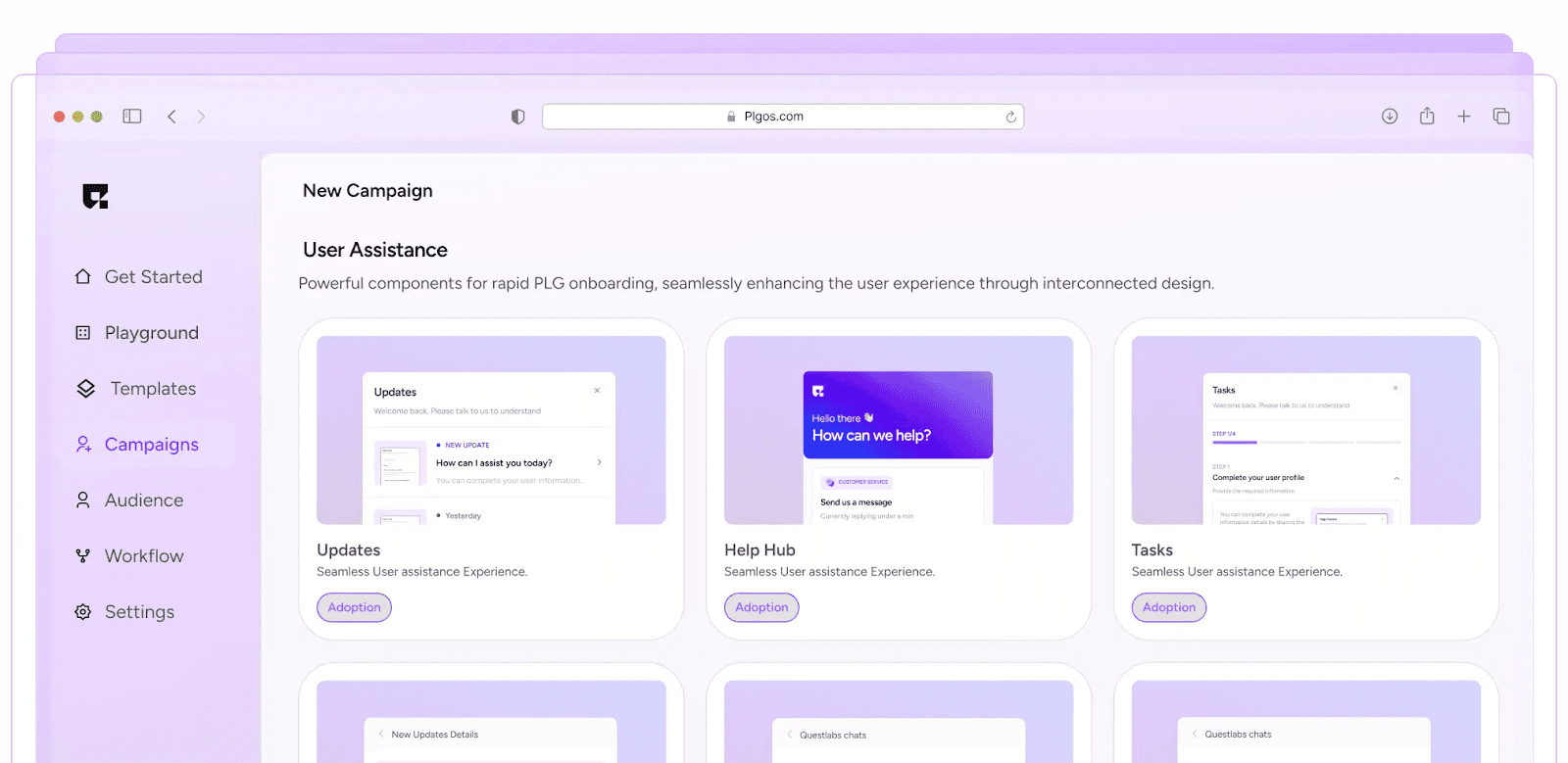
PLG OS (which stands for Product-Led Growth Operating System) is an easy-to-use, AI-driven set of tools for SaaS teams that want to create smooth onboarding, include feedback options, send helpful reminders, and study user actions—all without needing help With PLG OS you can:
- Launch onboarding checklists in minutes
- Trigger context-aware tooltips and modals
- Collect AI-assisted feedback via in-app, email, or SMS surveys
- Create activation streaks and milestone celebrations
- Track analytics on which guidance works—and which doesn’t
It’s essentially the mission control for your PLG user assistance strategies.
10 Strategies to Scale User Assistance with PLG
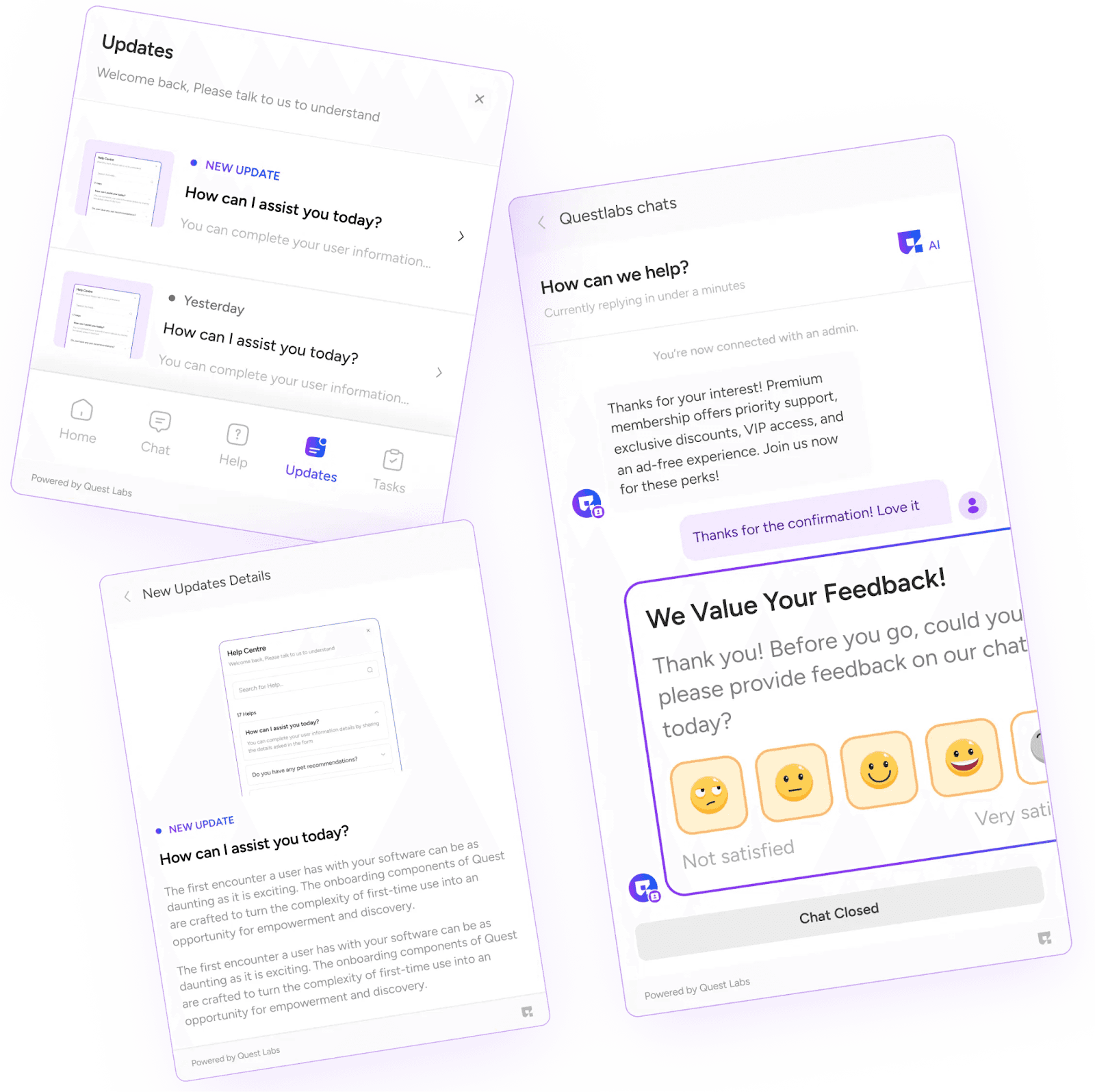
Now that we’ve covered the foundations, let’s go deep into the best PLG strategies for SaaS to scale onboarding, reduce support load, and boost activation.
Strategy #1: Micro-Assistance Through Contextual Nudges
What it is: Break onboarding into micro-goals—tiny jobs to be done—and serve context-aware nudges when users reach each step.
Why it works: Instead of one huge, overwhelming tutorial, users get bite-size guidance when and where they need it.
Implementation with PLG OS: Use PLG OS to detect user state, then deploy hotspot tooltips, modals, or banners that appear at relevant moments—e.g., “Add first team member,” “Set your first task,” “Upload a file.” The result: friction melts away and activation climbs.
Strategy #2: Build a Self-Serve Knowledge Loop with In-App Resources
What it is: Provide instant answers inside the app—help center links, tooltips, micro-videos—before users ever click “Support.”
Why it works: Empowers users to solve their own issues, reduces tickets, and elevates satisfaction.
Implementation with PLG OS: Embed dynamic help links or short instructional overlays tied to UI elements. Tie responses to user actions—if they pause on a confused page, prompt a help snippet or FAQ.
Strategy #3: Trigger In-App Surveys at Key Corridors
What it is: Ask for feedback exactly when users finish an important action—or fail to do so.
Why it works: Captures insight while emotions are fresh. Improves product and support proactively.
Implementation with PLG OS: Create AI-assisted surveys with PLG OS and deploy them after milestones like registration, first feature use, churn risk signals, or completion of a task. It shortens feedback loops and speeds iterative improvement.
Strategy #4: Personalize Onboarding by Persona or Use Case
What it is: Customize onboarding flows by role, industry, or goal (administrator, team lead, developer, etc.).
Why it works: Users learn faster when the product speaks directly to their needs.
Implementation with PLG OS: On sign-up, ask users their role or goal. Use that to launch tailored walkthroughs and feature guidance. PLG user onboarding becomes personal and efficient—boosting user activation and retention.
Strategy #5: Feedback-Triggered Help Escalation
What it is: If users report confusion or low satisfaction, automatically trigger extra support.
Why it works: Proactive intervention prevents churn and ups your empathy quotient.
Implementation with PLG OS: Set a threshold in NPS or CSAT surveys—if responses dip below 7/10, pop a “Let us help” modal or activate a chat widget (human or bot). Scale human support only where needed, driven by real feedback.
Strategy #6: Gamified Streaks and Progress Indicators
What it is: Use fun mechanics—streaks, progress bars, checklists to motivate daily or repeated engagement.
Why it works: Adds delight, marks progress, boosts adoption rates.
Implementation with PLG OS: PLG OS supports streaks and visual trackers. Build a 5-step checklist to full activation or a 7-day usage streak—and display celebratory messages as they progress. plgos.com
This strategy supports both onboarding and ongoing activation—bridging PLG user onboarding and activation.
Strategy #7: In-App Social Proof Nudges
What it is: Prompt users to “see how your peers are using this feature” or showcase usage stats (e.g., “Your team completed 3 boards today”).
Why it works: Social proof and curiosity drive exploration and retention.
Implementation with PLG OS: Trigger pop-ups or banners with user anonymized stats or case examples. e.g., “Teams like yours add 5+ new members in week one." These push people to explore features and engage deeper.
Strategy #8: Layered Help—FAQ → Tooltip → Chat only if needed
What it is: Provide tiered assistance: first FAQ or overlay; next tooltips; then human chat only when auto-help fails.
Why it works: Reduces agent load while still rescuing confused users.
Implementation with PLG OS: PLG OS acknowledges need-level. Show FAQ sidebar; if user still pauses for X seconds, deploy tooltip; if they click “Help,” route to chat or ticket.
This framework dramatically fortifies scaling customer support with PLG.
Strategy #9: Integrate Support Signals Into Product Analytics
What it is: Use analytics to correlate support events with onboarding milestones—identify drop-off points where people ask for help.
Why it works: You shift from reactive support to product improvement and predictive assistance.
Implementation with PLG OS: PLG OS tracks when surveys are launched, when bugs are flagged. Connect that to analytics platforms to spot patterns—e.g., users stuck at step 3, or many low CSAT around “project creation.” Then refine flows accordingly.
This fuels best PLG strategies for SaaS by blending product insights with support DNA.
Strategy #10: Enable Multi-Channel Help Without Losing Context
What it is: Whether a user seeks help via email, in-app, or SMS, they receive consistent, contextual assistance.
Why it works: It’s not just omnichannel—it’s smart assistance that understands where and how the user needs support.
Implementation with PLG OS: PLG OS offers feedback channels across in-app, email, SMS. No matter the entry point, the context is preserved—milestone data travels with the message.
The Takeaway
Scaling user assistance with PLG isn’t just about reducing ticket volume—it’s about embedding success into the product so deeply that users can’t help but activate, retain, and expand.
With PLG OS as your toolkit, you can design assistance that’s:
- Contextual
- Personalized
- Proactive
- Data-driven
That’s how PLG user assistance strategies go from being a “support cost” to being the growth engine of your SaaS.
FAQs
1. What is user assistance?
User assistance refers to all the in-app help, tooltips, FAQs, onboarding tours, and embedded guides that help users navigate and succeed with your product.
2. What does PLG stand for?
PLG means Product-Led Growth—a strategy where the product itself drives user acquisition, activation, retention, and upsell through delivering value up-front.
3. Why does PLG transform user assistance into a growth lever?
PLG embeds help directly into the user journey, making support proactive, contextual, and scalable—turning assistance from a cost center into an engine for activation and retention.
4. What are PLG onboarding strategies?
These are self-serve product journeys like checklists, contextual nudges, and persona-based walkthroughs that guide users toward meaningful activation without human intervention.
5. What is PLG OS?
PLG OS is a no-code, AI-enabled platform that empowers SaaS teams to build in-product guidance, feedback loops, and activation nudges seamlessly—scaling user assistance within the product itself.