5 Examples of User Journey Maps to Enhance Your UX

Ever wondered why some brands just get you? You open their app or visit their website, and everything feels... easy. Natural. It's as if they could read your mind.
That, my friend, is not magic. It’s an intelligent UX design powered by great user journey mapping.
A user journey map is like a secret blueprint showing precisely what your users experience, think, feel, and struggle with at every touchpoint. And when you get it right, you exceed expectations and don’t just meet them.
You need a user journey map with more than just pretty lines and colorful posts to create that magic. You need strategic, actionable maps built with real users in mind.
Ready to see how it’s done? Let’s dive into 5 user journey map examples that will inspire you to seriously level up your UX game.
What does User Journey Mapping mean?
A user journey map, which is sometimes called a customer journey map, shows how a normal user would use a product. A common method for studying user experience shows how people use and interact with a product over time, starting with the training flow for new users. The significance of the customer experience has increased, according to 63% of customer experience decision-makers.
By getting inside your users' heads through journey mapping, you can make fundamental changes to your product. While mapping out your user's journey, you'll find behaviors, patterns, and pain points that show you where and why you need to make changes.
It's more important than ever to make sure your users have a simple and easy-to-use experience. A poll of 15,000 people found that one-third would stop buying a brand after just one bad experience.
3 Kinds of User Journey Maps
You must pick the right way when you're ready to make a user journey map. How you choose the map will depend on what information you want to show and how much time you have to spend on the user trip. A well-executed User Interface (UI) design can increase website conversion rates by 200%
1. Maps of the Current State Journey
Most of the time, people use a current state journey map. You can see how your users are currently using your product and any problems with this type of tracking. They show you where your product works well and where it could improve by using data from how your present users interact with it.
You can learn more about your users' wants using current state journey maps. More than that, it will help you determine how to improve the user experience.
2. Journey plans for the future state
A future state journey map shows how the person should feel in a perfect world. This kind of map usually starts with the study you did for the current state map. It lets you be more creative because your current product or user experience does not limit you.
By drawing up a perfect state, you can determine what you need to build or change based on how the user would interact. 88% of online customers say they wouldn’t return to a website after having a bad user experience.
3. Journey plans of a day in the life
What does a day-in-the-life user journey map show? It shows a typical day for your user, from morning to night. You can see how customers use your product, when they use it, and what problems they're trying to solve with your goods with this mapping type.
You should use this type of journey map to find out what new goods and services your customers need to meet their daily needs and how your app can help them. This is because it focuses on how your customers use your services throughout the day.
Top 3 Benefits of User Journey Mapping
Making user journey maps can tell you a lot about how your customers use your product. Once these user journey maps are finished, they can be used to improve:
UX improvement
When you look closely at your UX, it's easy to lose sight of the big picture. It's easy to see why, you've been looking at your goods for a long time. Potential buyers, on the other hand, are not likely to feel as much empathy.
For them, one problem can ruin a process that would have been good otherwise. People who work in customer service may say that there is a steep learning curve. Your trip maps may help fix the problem.
A user journey map makes it easy to see where your UX design is failing, which you might not have seen during development or in-house testing.
The whole product team should also use a user journey map to double-check their work and make sure the product is easy to use. Someone on your team might see a problem place you couldn't see.
Product and feature adoption
Great hiring is easier when the UX is smooth. Your market research and analytics will show you the key events that make customers use your product and its features.
It's easier to find ways to shorten the time between getting new customers and turning them into long-term users when your user journey is laid out clearly.
For instance, creating a user biography doubles the number of people who use a product. When you look at your user journey map, you can see three steps between signing up for your product and creating a profile.
You could add the essential profile fields to the sign-up form and set your new customers up for success immediately instead of hoping they don't leave before they finish the profile.
By mapping their journey, you could find the best spots to send them in-app messages or emails about the wish list tool and what it can do for them. This helps you figure out what features are important to customers and what features aren't.
Company-wide loyalty
Every person of the team benefits from knowing what the customer wants. Understanding what might be frustrating for customers helps you relate to them and keep their problems in perspective. Others can see how a customer's experience affects their decision to buy more, leave, or promote the business.
Wisdom can get stuck in the walls of departments. A fully realized user journey map needs the input of people who aren't on the product management team.
Meeting with important people in your business is an integral part of the research phase of mapping because they can give you outside information that the product team can't get from data analysis.
5 User Journey Map Examples to Enhance Your UX
1. Spotify
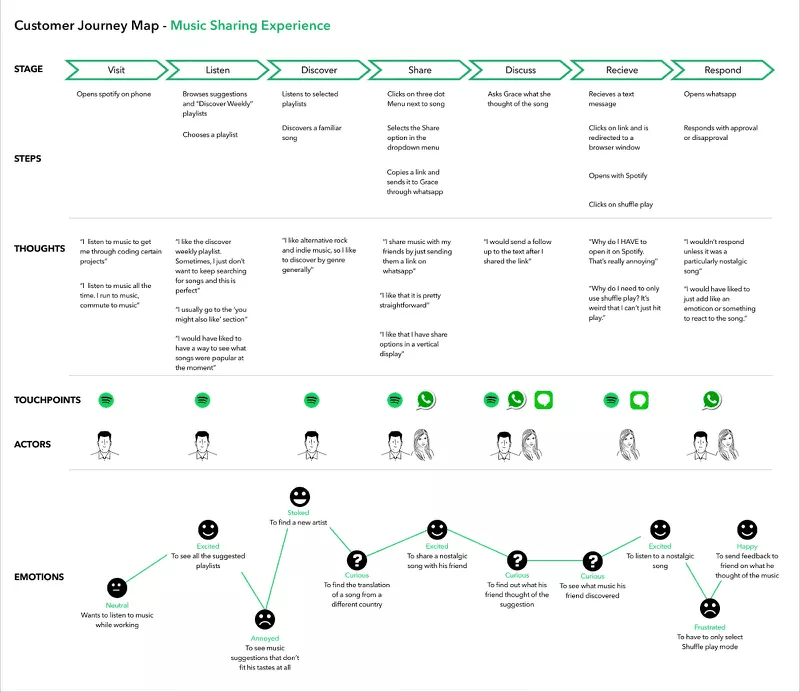
Spotify offers a wide range of services for users to enjoy music streaming. This case study provides an in-depth look at the steps taken by a Spotify customer to share music with their loved ones.
The user's ideas, feelings, touchpoints, and actors are depicted in the picture, along with their actions, to discover and share music. A user begins by launching Spotify to listen to music while working. They are thrilled to see the suggested playlists after researching them.
When they come upon music that brings them joy, they send a friend the link via WhatsApp so they may enjoy it, too. They check in again and patiently await a response.
Including two distinct characters' behaviors, ideas, and emotions makes this case all the more compelling.
2. Uber
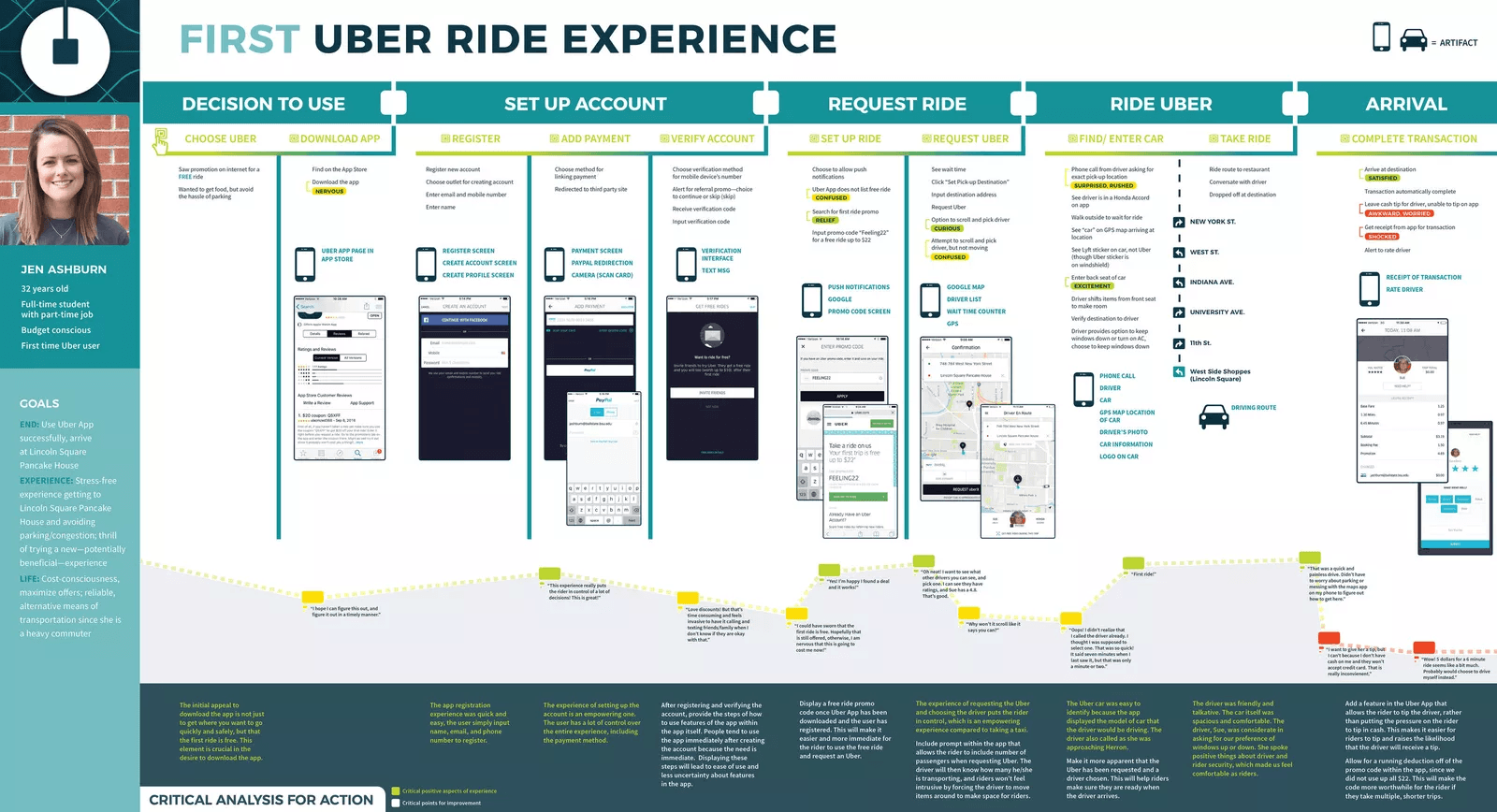
Uber is a widely used transportation company that facilitates the reservation of trips. This customer journey map illustrates the entire process of a user from the instant they select Uber as a new user until they reach their destination. It comprises screenshots showing the user's views during each stage of the consumer journey.
Goals from the persona on the side are included in this example. It also contains verbatim thoughts and emotion markers that provide a more profound understanding of the target persona.
The bottom section of the map provides crucial insights that assist marketing and sales teams in gaining a more profound understanding of the user and enhance their experience.
3. MailChimp
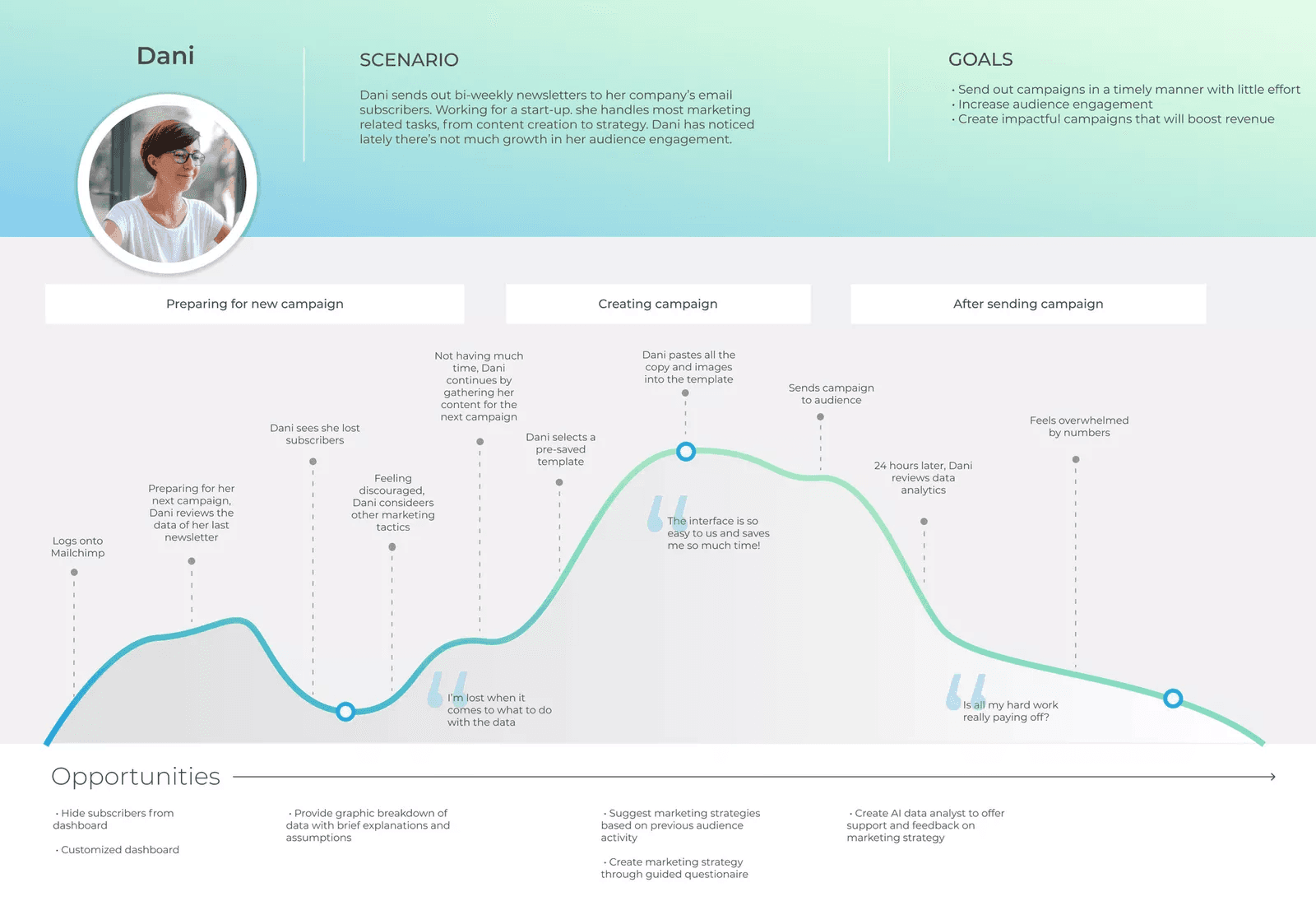
Mailchimp is a widely used email marketing platform. The customer journey map depicts Everything a marketing worker named Dani accomplishes every two weeks. This customer journey map consolidates all of the minor duties she performs before, during, and after a marketing email's transmission.
It is classified as a day-in-the-life map rather than a current-state map because it provides a more comprehensive account of the process than merely describing Dani's steps to send an email. Instead, it encompasses the emotions and opportunities she encounters before completing the mission and the digressions she takes.
4. Canva
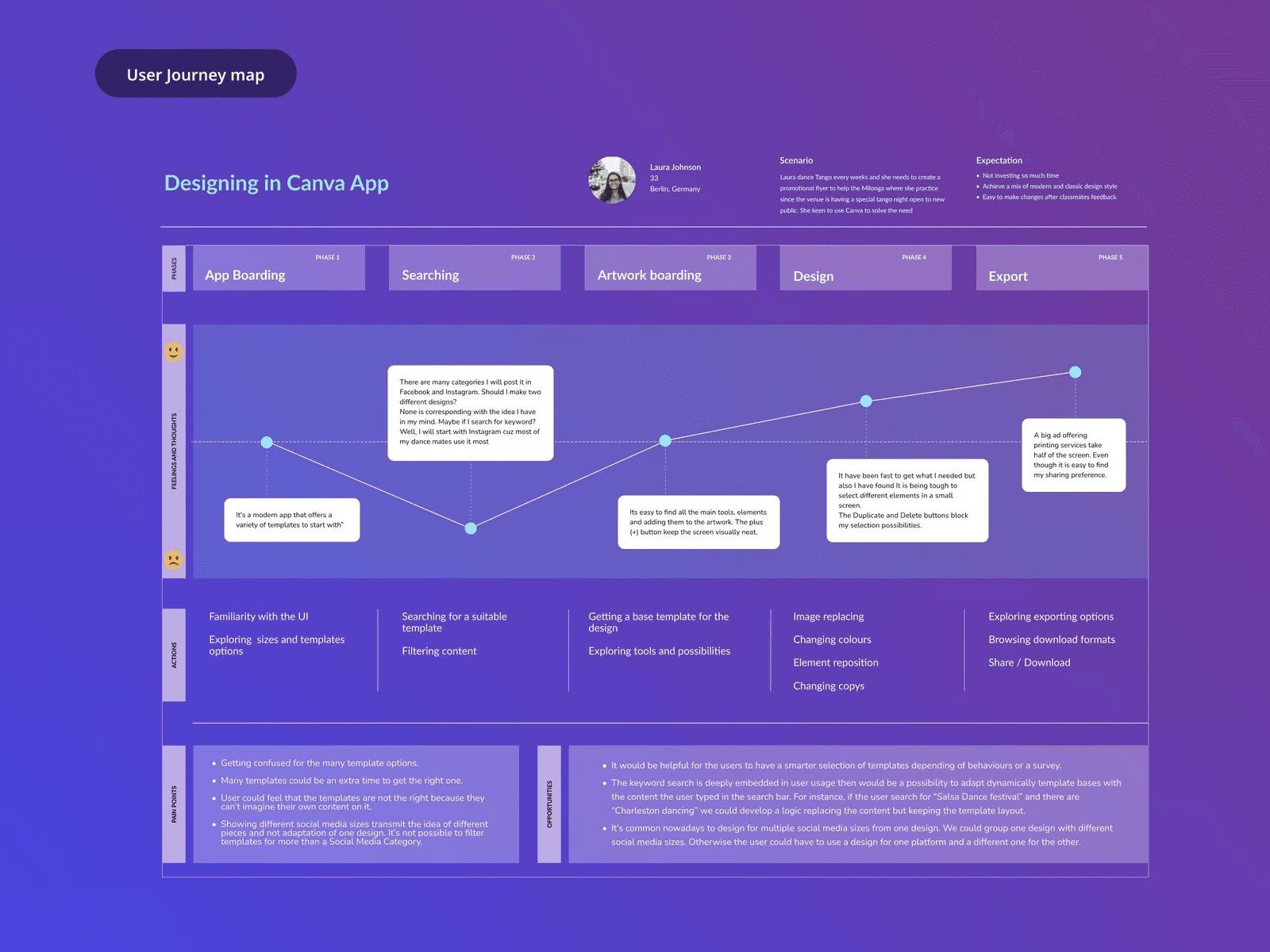
Canva is an online graphic design platform primarily designed for individuals who are not designers. This user map recounts the narrative of Laura, a woman who is not a designer but aspires to create visually appealing flyers to advertise her pastime.
The map illustrates the process of developing a novel design. The process commences with Laura's creation of a board and concludes with the exportation of the design. This voyage map is also limited to a single scenario, similar to the Netflix example.
Additionally, this user journey encompasses actions, pain points, expectations, objectives, and thoughts throughout the phases.
5. Say Yeah!
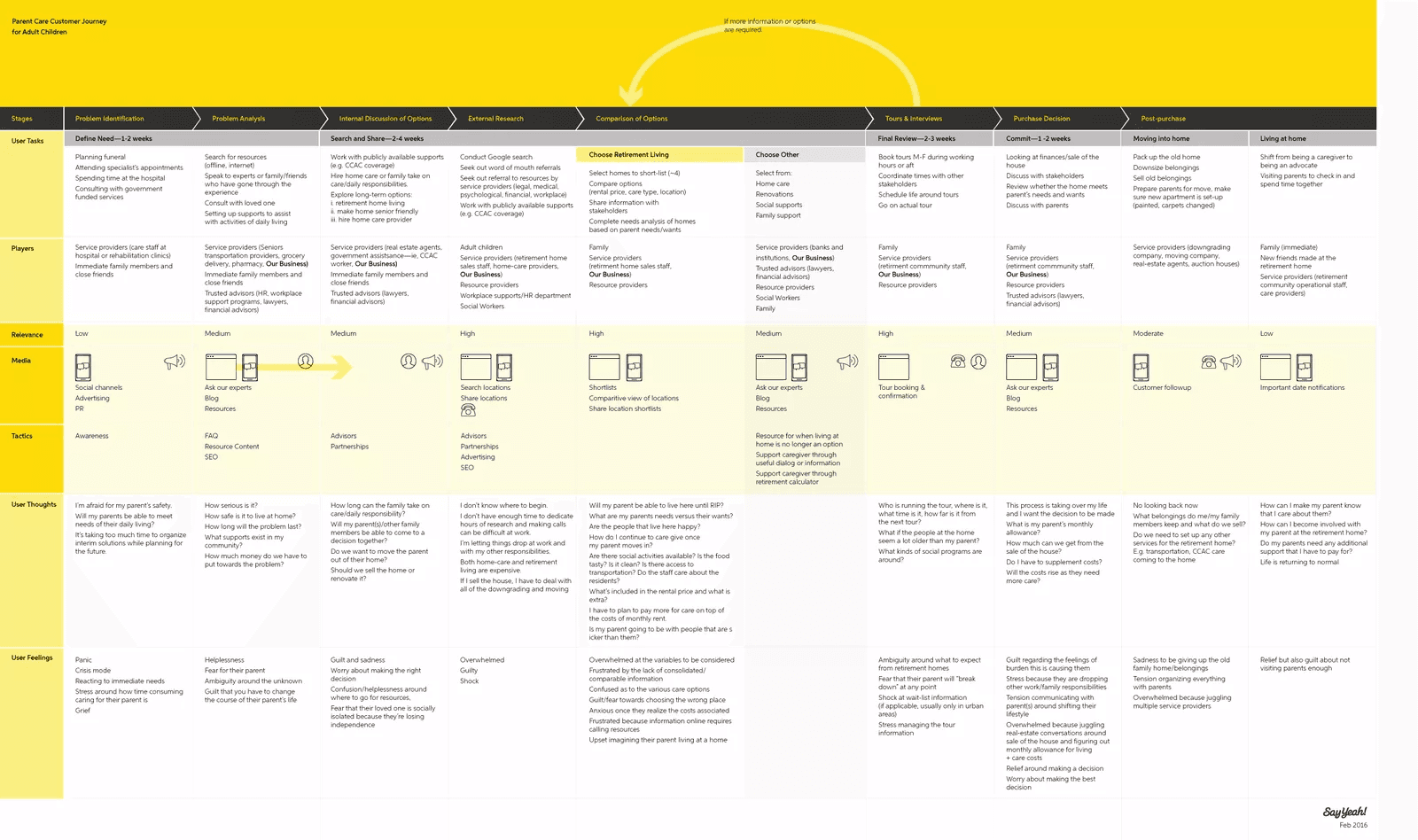
This organization assists businesses in providing products and services more suitable for neurodiverse consumers. To evaluate this consumer journey, focusing on the screen's left side and navigating through the stages is necessary.
This is the voyage of an adult child seeking health support for their parents, as is evident. It commences upon discovering an issue and concludes upon the completion of a purchase.
This map encompasses the user's thinking process, emotions, media, tactics, actors, and tasks throughout the phases. It also demonstrates the importance of each instance in correctly serving the customer.
How does PLG OS help create user journey maps?
PLG OS by Questera is a comprehensive growth platform that enhances user experience and drives product adoption. It offers tools that facilitate the creation of dynamic user flows, effectively mapping the customer journey from initial awareness to post-purchase engagement. This mapping allows businesses to identify and address user pain points, optimize touchpoints, and personalize interactions, improving customer satisfaction and retention.
By leveraging PLG OS, companies can gain valuable insights into user behavior and preferences, enabling them to tailor their strategies to meet customer needs more effectively. This leads to a more intuitive and engaging user experience, fostering loyalty and encouraging growth through product-led strategy.
Key Takeaway
The mapping of your user journey eliminates a significant amount of the uncertainty associated with strategy and innovation. Consider the example of your acquaintance who provides incorrect directions. You may continue to depend on their inadequate guidance each time you embark, thereby gradually descending into madness. Alternatively, you could conduct preliminary research and generate your precise map that explicitly illustrates the path forward.
Additionally, the PLG OS enables user journey maps within the platform, which can be used to plan and visualize in-app experiences more effectively. If interested, schedule a call with us today to learn more about our company.
FAQs
What is a user journey map?
A user journey map visualizes the steps a user takes to interact with a product or service.
Why is user journey mapping important for UX?
It helps identify pain points and opportunities to improve the overall user experience.
How can PLG OS help with user journey mapping?
PLG OS provides data-driven insights to map real user behavior and improve engagement.
What should a good user journey map include?
The key stages, user actions, emotions, pain points, and improvement opportunities should all be included.
Who should use user journey maps?
Product teams, designers, marketers, and customer success teams benefit the most.