8 Quick User Experience Optimization Examples to Boost UX

The quick answer
Quick answer: to optimize user experience, find the step where users struggle most, make one small change there and measure the same metric again. The changes that pay off fastest are usually a shorter onboarding flow, clearer navigation labels, faster pages (Google’s Core Web Vitals targets are a good yardstick), help placed next to the step where people get stuck, touch targets large enough for mobile, and one short in-app question to ask users why. The eight examples below each come with a quick change, and the table after them shows how to measure it.
Imagine walking into a store where the layout is confusing, the signs don’t make sense, and the checkout line takes forever. Chances are, you’d leave—and never come back. The same logic applies online. That’s where UX optimization comes in. It’s all about making digital experiences seamless, intuitive, and delightful so users not only stay but keep coming back. From smoother onboarding to faster load times, even small tweaks can have a massive impact. Let’s check out 8 user experience optimization to boost your UX.
What is UX Optimization?
UX Optimization (short for User Experience Optimization) is the process of improving how users interact with your digital product—whether it’s a website, mobile app, or software platform—so that the experience is smoother, faster, and more enjoyable. When it isn’t, most people don’t complain; they just stop coming back.
Think of it like fine-tuning your product so users don’t just “use” it, they love using it.
Instead of focusing only on design or aesthetics, UX optimization digs into:
- Ease of navigation – Can users find what they need quickly?
- Clarity of design – Are buttons, forms, and CTAs intuitive?
- Speed and performance – Does the site/app load fast enough?
- Accessibility – Can everyone (including people with disabilities) use it easily?
- Personalization – Does the experience adapt to user needs?
At its core, UX optimization aligns your product with human behavior. It reduces friction, anticipates needs, and ensures that the user journey feels effortless from start to finish.
Benefits of UX Optimization
Now that you know what it is, let’s explore why UX optimization matters. Accessible design matters too: in the UK’s Click-Away Pound Survey 2019, 69% of participants with access needs said they will simply leave a problematic website (71% in the 2016 survey). See? Inclusive UX isn’t optional. Here are the biggest benefits:
1. Higher User Engagement
A product that feels easy and enjoyable encourages users to spend more time exploring. Smooth navigation, faster performance, and intuitive design all keep users hooked.
2. Improved Conversion Rates
When you remove friction points (like confusing forms or slow checkouts), users are more likely to complete key actions—signing up, upgrading, or purchasing. In fact, small UX optimization tips fast can lead to major revenue growth.
3. Reduced Churn
Bad UX is one of the top reasons users abandon a product. Optimizing the experience ensures users not only come but stay, and it reduces churn you would otherwise try to win back later.
4. Better Customer Satisfaction and Loyalty
Happy users are loyal users. When you continually improve the user experience, customers feel valued, leading to long-term trust and brand advocacy.
5. Stronger Competitive Advantage
In crowded markets, UX can be the ultimate differentiator. If your product feels easier and faster than competitors, users will naturally prefer yours.
6. Lower Support Costs
An intuitive product reduces the need for customer support. When users can find answers themselves or easily figure out how to use features, support tickets decrease.
7. Data-Driven Improvements
Product analytics, session recordings and in-app surveys show where users actually struggle, so each change targets a real problem rather than a guess.
Why Quick UX Optimization Matters
Before we jump into examples, let’s address the why. Users today expect products that are intuitive, seamless, and fast. A clunky interface or confusing flow can lead to frustration and lost revenue. Quick UX optimization strategies let you identify pain points and implement simple user experience improvements without a full-scale redesign.
By focusing on user experience examples that are easy to implement, you can see measurable results quickly—boosting engagement, satisfaction, and loyalty.
1. Streamline Onboarding Flows
A smooth onboarding experience is often the first impression your users have. Confusing sign-up processes or unnecessary steps can cause users to abandon your product before they even get started.
Quick UX optimization tip:
- Remove friction: Reduce the number of form fields and allow social logins.
- Highlight key features: Use tooltips or guided tours to showcase value quickly.
- Personalize the experience: Use user data to tailor the onboarding flow.
How PLG OS helps: PLG OS provides onboarding components (an onboarding quiz, a get-started guide, walkthroughs and a quest list) whose text you can change from a no-code dashboard without a release, and data from each component is added to the user’s profile in PLG OS.
2. Optimize Navigation for Clarity
Complex menus and buried features frustrate users. Your navigation should guide users effortlessly to what they need.
Quick UX optimization strategy:
- Simplify menus: keep top-level navigation short enough to scan at a glance.
- Use clear labels: Avoid jargon; speak the language of your users.
- Prioritize frequently used features: Analyze usage patterns to make navigation intuitive.
There’s no magic number of menu items. Nielsen Norman Group calls the idea that menus must stop at seven items a common misconception, because people scan a menu rather than memorize it; clear labels and sensible grouping matter more than the count. To find what users ignore, compare your usage data with what users tell you in a short in-app survey, such as PLG OS’s Feature Usage Survey component.
3. Speed Up Load Times
Speed is a critical element of user experience optimization, and small gains count. In a Google-commissioned Deloitte study of 37 brands, a 0.1-second improvement in mobile site speed was followed by an 8.4% increase in conversions for retail sites. Google’s Core Web Vitals turn “fast” into targets: Largest Contentful Paint within 2.5 seconds, Interaction to Next Paint of 200 milliseconds or less and Cumulative Layout Shift of 0.1 or less, measured at the 75th percentile of page loads.
User experience examples of fast improvements:
- Compress images and use modern formats like WebP
- Enable lazy loading for content-heavy pages.
- Minimize unnecessary scripts or plugins.
Third-party scripts are the part teams forget, including the onboarding and survey tools added to improve UX. Hold every vendor to numbers: our onboarding SDK performance budget worksheet lists the four figures to ask for and how to measure a script’s real effect on your Core Web Vitals.
4. Use Contextual Help and Tooltips
Users often get stuck when the interface doesn’t clearly communicate how to use features. Contextual help and tooltips can resolve confusion without requiring full support interactions. The moment right after an action fails deserves the most care, because the user is stuck and most likely to give up.
Simple user experience improvements:
- Add inline tooltips for complex features.
- Use microcopy to guide users through actions.
- Offer in-app help directly where users need it.
Write that error-state help like a feature, not a toast that says “error”. Our failed-action recovery prompt specification covers the trigger, the copy and the one recovery action each prompt should offer.
5. Enhance Mobile Experience
With mobile users on the rise, optimizing your app or website for small screens is crucial.
Quick UX optimization examples for mobile:
- Simplify forms and input fields.
- Use responsive design to adapt content layout.
- Optimize touch targets and button sizes.
For touch targets there is a published floor: WCAG 2.2 success criterion 2.5.8 (Level AA) asks for targets of at least 24 by 24 CSS pixels, with exceptions such as enough spacing around smaller targets or links inside a sentence. If your onboarding uses tours or tooltips, also run a keyboard-accessible product tour acceptance test so people who don’t use a mouse or touch screen can finish them.
6. Personalize the User Journey
Personalization is a powerful lever for improving user experience. Users engage more when content, features, and messaging are relevant to them.
Quick UX optimization strategies:
- Recommend features or content based on usage history.
- Segment users by behavior or role for targeted experiences.
- Send in-app messages that address individual user needs.
On its Growth plan, PLG OS segments audiences by custom events and attributes, so in-app messages and onboarding components can be shown only to the users they fit, without a full revamp.
7. Reduce Cognitive Load
Overloading users with too much information or too many options leads to frustration. UX optimization involves simplifying the interface and making actions obvious.
Simple user experience improvements:
- Use progressive disclosure: Show options only when necessary
- Keep visual hierarchy clear: Highlight primary actions.
- Limit choices per screen to avoid decision fatigue.
8. Gather Feedback and Iterate Quickly
Even the best UX improvements can benefit from user feedback. Collecting real-time insights allows you to iterate faster and more efficiently.
User experience optimization tips fast:
- Add in-app surveys for quick feedback.
- Monitor feature usage to detect friction points.
- Run A/B tests for design tweaks.
PLG OS covers the collection side with in-app surveys, an NPS survey, inline feedback and a feedback workflow for bug reports and feature requests, and its component pages list A/B testing, so you can test a design tweak and ask users about it in the same place.
The eight optimizations compared
Each optimization comes with a change you can ship this week and a number that tells you whether it worked. Measure before you change anything, or you won’t know what moved.
| Optimization | Quick change | How to measure it |
|---|---|---|
| Streamline onboarding flows | Cut signup fields and guide users to one key action | Signup completion and time to the first key action |
| Optimize navigation | Rename vague labels and surface the most-used features | Task success rate and searches for items already in the menu |
| Speed up load times | Compress images, lazy-load, remove unused scripts | LCP ≤ 2.5 s, INP ≤ 200 ms, CLS ≤ 0.1 at the 75th percentile |
| Contextual help and tooltips | Put help next to the step where users stall | Support tickets and repeat errors on that step |
| Enhance mobile experience | Responsive layout, shorter forms, bigger touch targets | Mobile task completion; targets at least 24 × 24 CSS px (WCAG 2.2 AA) |
| Personalize the user journey | Show different first steps by role or behavior | Activation rate by segment |
| Reduce cognitive load | One primary action per screen; hide advanced options | Time on task and error rate |
| Gather feedback and iterate | One short in-app question after a key task; A/B test fixes | Response rate, recurring themes and test results |
How PLG OS Helps with UX Optimization
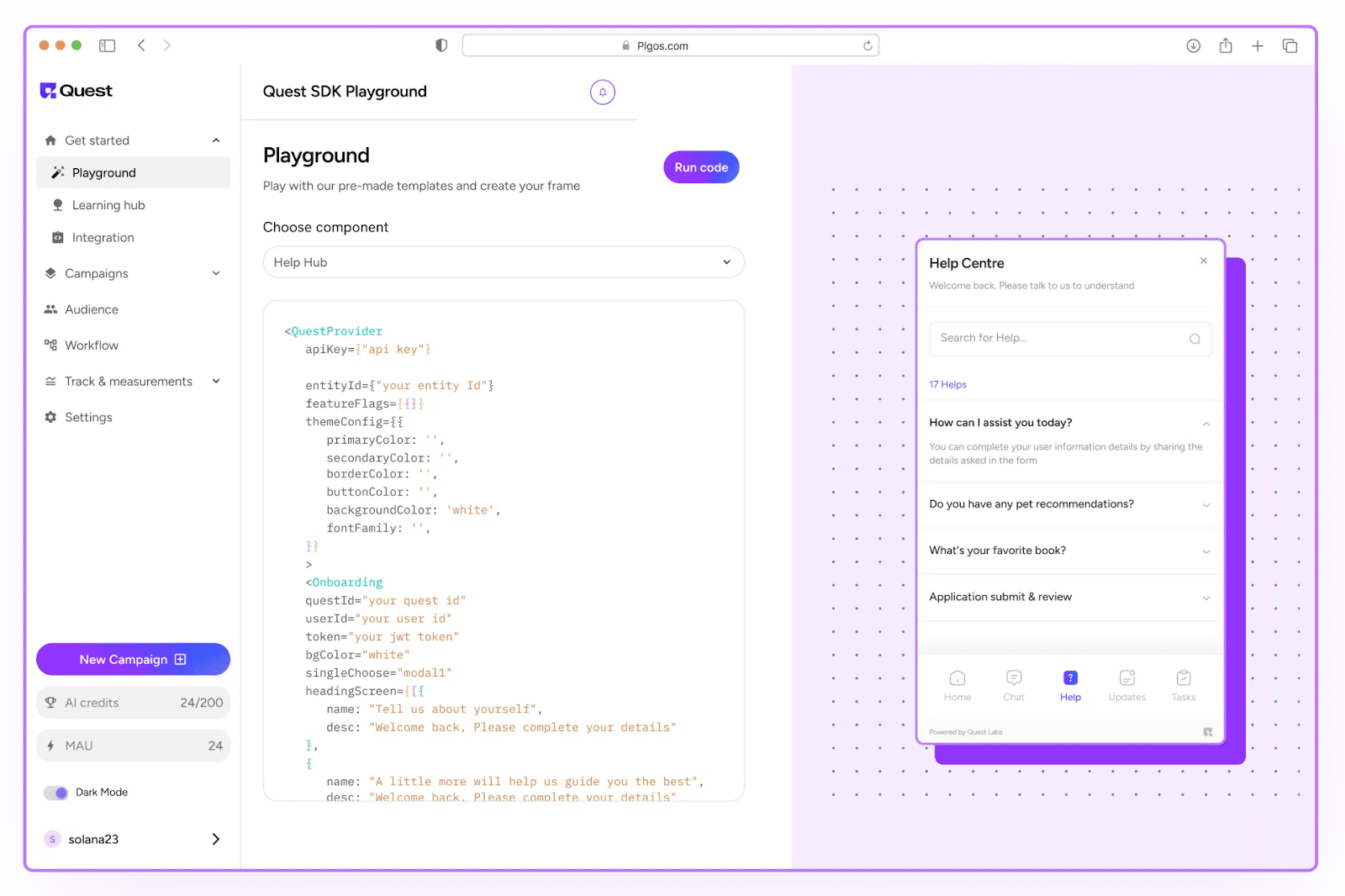
PLG OS is a set of in-app components for product-led growth. Its onboarding (quiz, walkthroughs, quest list, tips), user assistance (Help Hub, search) and feedback components (surveys, NPS, inline feedback) install through an SDK for web and mobile, and their text can be changed from a no-code dashboard, so teams can ship quick UX optimization strategies without waiting for a release.
Each component’s data is added to the user’s profile in PLG OS and can be sent to your CRM or other tools, and component pages list A/B testing and personalization, which makes simple user experience improvements measurable. As of September 2026 there is a free tier for 100 monthly tracked users, and paid plans start at $49 a month on monthly billing, according to its pricing page.
Key Takeaways: Quick Wins for UX
- Streamline onboarding flows for a smoother first impression.
- Simplify navigation to guide users effortlessly.
- Optimize load times to reduce frustration.
- Use contextual help to eliminate confusion.
- Enhance mobile experiences for on-the-go users.
- Personalize user journeys to boost engagement.
- Reduce cognitive load for clarity and ease of use.
- Gather feedback and iterate quickly for continuous improvement.
Each of these quick user experience optimization examples can be implemented in days, not months. With tools like PLG OS, these strategies become even more effective, giving you insights that drive better UX decisions.
Final Thoughts
UX optimization doesn’t have to be overwhelming. By focusing on simple, actionable improvements, you can see rapid results in engagement, satisfaction, and retention. The key is to test, iterate, and use the right tools to guide your decisions.
PLG OS gives you in-app onboarding, help and feedback components to test new flows and ask users what they think. Start small, apply these quick UX optimization strategies, and watch your product transform into an intuitive, user-friendly experience that keeps users coming back.
For the tools behind these fixes (session replay, A/B testing, surveys and usability testing), see our list of the best user experience optimization tools.
FAQs
1. How do you optimize user experience?
Start with evidence of where users struggle: drop-off points, support tickets, session recordings and short in-app surveys. Fix the biggest problem first with a small change, such as fewer form fields, clearer labels, a faster page or help placed next to the step, then measure the same metric again. Repeat that loop instead of waiting for a redesign.
2. What is UX optimization?
UX optimization is the process of improving how users interact with your website, app, or product to make it easier, faster, and more enjoyable to use. It covers navigation, clarity, speed, accessibility and personalization, and it works best as a series of small, measured changes.
3. Why is UX optimization important?
Good UX keeps users engaged, improves conversions, reduces churn, and helps your product stand out in a crowded market. Accessibility is part of it: in the UK Click-Away Pound Survey 2019, 69% of participants with access needs said they will simply leave a problematic website.
4. What are some quick UX optimization strategies?
Simplify navigation, speed up load times, streamline onboarding, and add contextual help like tooltips. For speed, Google's Core Web Vitals give concrete targets: Largest Contentful Paint within 2.5 seconds, Interaction to Next Paint of 200 milliseconds or less and Cumulative Layout Shift of 0.1 or less, measured at the 75th percentile of page loads.
5. What tools can help with UX optimization?
Use product analytics to find where users drop off, session recordings and heatmaps to see why, and in-app surveys to ask them. PLG OS covers the in-app side with onboarding, help and feedback components (surveys, NPS, inline feedback and a feedback workflow) whose text you change from a no-code dashboard.